FIBRUS VALUE FOR MONEY REVIEW

Fibrus value for money: How good is it?

Fibrus is good value overall. Your price stays fixed during the minimum term, every package includes an eero router and packages from 500Mbps upwards come with two eeros. Paid extras and higher out-of-contract prices can still push up your bill, so the package price doesn’t tell the whole story.
By Data checked  Checked weekly
Fibrus value for money hero balancing coins against an eero 7 and parcel

Fibrus Value for Money Scorecard

Six key areas. One overall score. All calculated using our transparent methodology.

What you get as standard

The features, equipment and services included as standard, before paid add-ons, premium tiers or optional upgrades are added.

7.4/10

Included router quality

How much value the included router adds to the package, including Wi-Fi standard, ports, coverage and overall hardware quality.

7.9/10

Annual price rises

How clearly annual price rises are explained, how predictable they are, and how much they add during the minimum term.

10/10

Cost of upgrades and extras

Which useful extras cost more, which are bundled in, and whether upgrades feel sensible or too easy to overspend on.

5.5/10

End-of-contract pricing

What happens when the minimum term ends, whether the price jumps, and how easy it is to avoid poor rollover value.

7.6/10

Service guarantees

The service guarantees, speed promises, compensation rules and fault protections that apply when the connection underperforms.

6.5/10

What you get as standard

Every Fibrus package includes an eero router, while packages from 500Mbps upwards come with a second eero for wider Wi-Fi coverage. The broadband buyout can also make it considerably cheaper to leave your old provider. TV and home phone are available, but they cost extra, and you don’t get a mobile bundle, included streaming subscription or broadband backup.

The included routers and broadband buyout stand out most

Every package includes an Amazon eero chosen for its speed. You get the Wi-Fi 6 eero 6+ with the lower-speed packages and the Wi-Fi 7 eero 7 with 1Gbps and 2Gbps. From 500Mbps upwards, Fibrus includes two matching eeros instead of making you pay separately for your first extender.

You can receive up to £400 towards the cost of leaving your old provider if you’re eligible. That can make switching much more affordable, although you must take an 18-month Fibrus contract and provide proof within 40 days. Fibrus can reclaim part of the payment if you leave early.

TV and home phone are available, but they aren’t freebies

Fibrus TV combines live television, streaming apps and cloud gaming through an optional puck, while Fibrus Talk provides a home-phone service over the fibre connection. Both let you keep more services on one account, but both add to your broadband bill.

You don’t get an included Netflix subscription, consumer mobile service, broadband-and-mobile discount, provider email or mobile broadband backup. You may not miss any of them, but Fibrus isn’t an all-in-one provider. The optional battery can keep your router and ONT powered temporarily during a power cut, but it can’t provide internet access if the broadband line fails.

The entry package covers the everyday essentials

Full Fibre 150 includes an eero 6+, app controls, guest Wi-Fi, parental controls and automatic updates. It doesn’t include the Total Home Wi-Fi Guarantee or a second eero, so you’ll get less help with Wi-Fi coverage if your home has several floors or thick walls.

If you’re eligible for Fibrus’s social tariff, it may suit you better than a standard package with paid extras, particularly if keeping the monthly bill down matters most.

Faster packages include better routers, not filler

If you choose a package from 500Mbps upwards, you get a second eero. The 1Gbps and 2Gbps packages also use the Wi-Fi 7 eero 7. The second router can improve coverage across more rooms, while the eero 7 is better suited to the fastest broadband speeds.

Don’t choose the package for its router alone. If you mainly browse, stream and make video calls, you may save more by choosing a suitable speed instead of paying for capacity you’ll rarely use.

AT A GLANCE

What you get with Fibrus

Here's what's included as standard, what may cost extra, and what's included with premium packages.

Feature
On all standard packages
Paid extra
Included with premium packages
Landline
No
Yes
No
App management
Yes
No
Yes
Parental controls
Yes
No
Yes
Guest network
Yes
No
Yes
Router security features
Yes
No
Yes
Automatic firmware updates
Yes
No
Yes
Wi-Fi guarantee
No
No
Yes
Mesh devices
Yes
Yes
Yes
Security software
No
No
No
Provider email
No
No
No
Broadband backup
No
No
No

Standard kit versus paid extras

This table separates everyday included features from extras that may depend on package tier, router choice or paid add-ons.

✓

Good to know: Included features are easier to compare because you won’t need to budget for them separately.

✕

Worth checking: Some useful extras may only be included on selected packages or as paid add-ons.

Every package includes an eero router, with better routers and more mesh coverage as speeds rise. Two eeros from 500Mbps upwards can be more useful if you have a larger home than extra features squeezed into a single router.

TV, Fibrus Talk, additional eeros and a static IP all cost extra. You also don’t get an included streaming subscription, mobile bundle or broadband backup. The standard package covers the broadband essentials; add an extra only if you’ll genuinely use it.

How to decide which Fibrus additions are worth paying for

  1. Choose the right speed first

    Choose a speed you’ll actually use. Paying for a faster package won’t fix badly placed routers or Wi-Fi interference from thick walls.

  2. Count the included eeros

    Full Fibre 150 starts with one eero, while packages from 500Mbps upwards include two. That means you may not need to pay for another mesh router.

  3. Price TV and phone separately

    Add Fibrus TV or Fibrus Talk only if you’ll use it. Neither service is included in the broadband price.

  4. Read the broadband buyout conditions

    Fibrus offers a very generous broadband buyout. You must provide proof on time, take an 18-month contract and repay part of the money if you leave early.

  5. Check social-tariff eligibility

    If you qualify for Fibrus’s social tariff, it may be cheaper and more suitable than a standard package with several paid extras.

Fibrus covers the broadband essentials well without including every possible extra. You get an eero with every package, a second mesh router with faster packages and help with your old provider’s exit charge if you’re eligible. TV and home phone give you more choice, but they cost extra. You don’t get a mobile bundle, included streaming subscription or broadband backup, so Fibrus won’t put all your services on one bill.

7.4 /10
Overall score

What you get as standard score

This score looks at the useful extras included before you start paying more, including router controls, security features, Wi-Fi help, backup options and everyday add-ons.

Included router value

The included routers offer good value. You get the eero 6+ with the lower-speed packages, while the fastest packages come with the Wi-Fi 7 eero 7 and 2.5Gb Ethernet. Packages from 500Mbps upwards include two eeros. You can’t choose the model or pay for a premium router upgrade, but Fibrus matches each router sensibly to the package speed.

Fibrus supplies one of two eero routers, depending on speed

Both supplied eeros are good routers for everyday use

You get the eero 6+ with a lower-speed package. It includes Wi-Fi 6, app controls, guest Wi-Fi, parental controls and automatic updates. The 1Gbps and 2Gbps packages come with the eero 7, adding Wi-Fi 7, support for more connected devices and two 2.5Gb Ethernet sockets. Neither router uses the 6GHz band, but both are suitable for everyday home broadband.

Two included eeros improve the faster packages

You get two matching eeros with packages from 500Mbps upwards. That’s particularly helpful if your home has several rooms or floors because the second router can extend Wi-Fi closer to a weak area. The main eero leaves only one Ethernet socket free after connecting to the ONT, but a small switch can add more wired ports cheaply.

Your package decides the router

You can’t choose either eero independently or pay for a premium Fibrus router at checkout. The lower-speed packages use the eero 6+, while the two fastest packages use the eero 7. You can’t get Wi-Fi 7 with a slower package, but you also avoid paying for router features you may not need.

The eero app makes everyday controls easy to use, although you don’t get a browser admin page, WPS or detailed manual tuning. If you want more control, you can connect your own router or use eero bridge mode. You’ll probably get more benefit from the simple app and included mesh coverage than from specialist settings.

INTERACTIVE TOOL

Compare routers from any provider

This provider’s routers are pre-selected for comparison with one another. However, you can use this tool to compare any router from any major provider using the dropdown menus below.

Feature Amazon eero 6+ Amazon eero 7
Fibredog rating 6.4/10 7.0/10
Router included as standard Yes; supplied on the 150Mb, 300Mb and 500Mb tiers. Fibrus currently supplies one unit on 150Mb and two on 500Mb; allocation can vary by package. Yes; two units are supplied on the 1Gb and 2Gb tiers.
Router manufacturer Amazon eero Amazon eero
Router model R010001 PA10001
Wi-Fi standard Wi-Fi 6 Wi-Fi 7
Wi-Fi bands Dual-band Dual-band
2.4GHz supported ✓Yes ✓Yes
5GHz supported ✓Yes ✓Yes
6GHz supported ×No ×No
Beamforming ✓Yes ✓Yes
Antenna count 2 2
Maximum connected devices Up to 75 Up to 120
Stated coverage Up to 1,500 sq ft per unit Up to 2,000 sq ft per unit
Total Ethernet ports 2 2
MU-MIMO ×No ×No
OFDMA ✓Yes ✓Yes
WPA3 security ✓Yes ✓Yes
Guest network ✓Yes ✓Yes
Antenna type Internal Internal
Gigabit Ethernet ports 2 0
2.5Gb Ethernet ports 0 2
5Gb Ethernet ports 0 0
10Gb Ethernet ports 0 0
WAN port speed 1Gbps 2.5Gbps
USB ports 0 0
Telephone ports 0 0
ONT Ethernet input ✓Yes ✓Yes
Coaxial input ×No ×No
Power connection USB-C / external 15W power adapter USB-C / external 15W power adapter
Mesh support Provider mesh add-ons Provider mesh add-ons
Provider mesh product Total Home Wi-Fi Guarantee Total Home Wi-Fi Guarantee
Third-party router use You can use your own router You can use your own router
Modem mode ✓Yes ✓Yes
Compatible broadband technology fttp fttp
App management ✓Yes ✓Yes
Parental controls ✓Yes ✓Yes
QoS ✓Yes ✓Yes
Automated QoS ✓Yes ✓Yes
Device prioritisation ×No ×No
Anti-bufferbloat controls ✓Yes ✓Yes
Manual queue management (SQM/CAKE) ×No ×No
Smart channel selection ✓Yes ✓Yes
Security features WPA2/WPA3; TLS cloud connectivity; guest isolation; Profiles; automatic security updates; optional eero Plus filtering and ad blocking WPA2/WPA3; TLS cloud connectivity; guest isolation; Profiles; automatic security updates; optional eero Plus filtering and ad blocking
Gamer mode ×No ×No
Game traffic prioritisation ×No ×No
Gaming QoS profiles ×No ×No
Server ping routing tools ×No ×No
Latency dashboards ×No ×No
Per-device gaming presets ×No ×No
Gaming VPN routing features ×No ×No
Work from home mode ×No ×No
Automatic firmware updates ✓Yes ✓Yes
Firmware update notes eeroOS updates are pushed automatically on a rolling basis; customers can choose a preferred update window or install an available update manually. eeroOS updates are pushed automatically on a rolling basis; customers can choose a preferred update window or install an available update manually.
Router height 66mm 64mm
Router width 99mm 130mm
Router depth 97mm 130mm
Router weight 315g 606g
Power consumption 15W 15W
Router orientation Horizontal Horizontal
Wall mountable ×No ×No
Router colour White White
Self-installation ✓Yes ✓Yes
Browser admin interface ×No ×No
WPS ×No ×No
Status light control ✓Yes ✓Yes
Reset button ✓Yes ✓Yes
Wi-Fi on/off button ×No ×No
Where would you like to go next? See all tools See all tools
Compare all broadband deals

Which routers and eeros come with each Fibrus package

Lower-speed packages

You get the eero 6+.

Full Fibre 150, 300 and 500 use Fibrus's Wi-Fi 6 router. Full Fibre 500 includes two eeros rather than one.

The two fastest packages

You get the eero 7.

The 1Gbps and 2Gbps packages use the Wi-Fi 7 eero 7, which has two 2.5Gb Ethernet sockets and supports more connected devices.

Need wider coverage?

Packages from 500Mbps upwards include two eeros.

If one of your eligible rooms still misses the 10Mbps guarantee after troubleshooting, Fibrus can provide a third eero without an extra charge.

Do the supplied eeros offer good value for money?

Yes, particularly if you choose a package from 500Mbps upwards. Two included eeros make it easier to get usable Wi-Fi beyond the room containing the fibre connection. The eero 7 also gives you multi-gigabit Ethernet with the fastest packages, so one compatible device can receive more than 1Gbps over a wired connection.

The main drawbacks are the lack of choice and advanced controls. You can't select the eero 7 with a slower package, pay for a premium Fibrus router or manage either eero through a conventional browser page. Both are dual-band and lack 6GHz Wi-Fi. If you don't enjoy changing detailed router settings, those limits probably won't outweigh the simple app and two-eero mesh coverage.
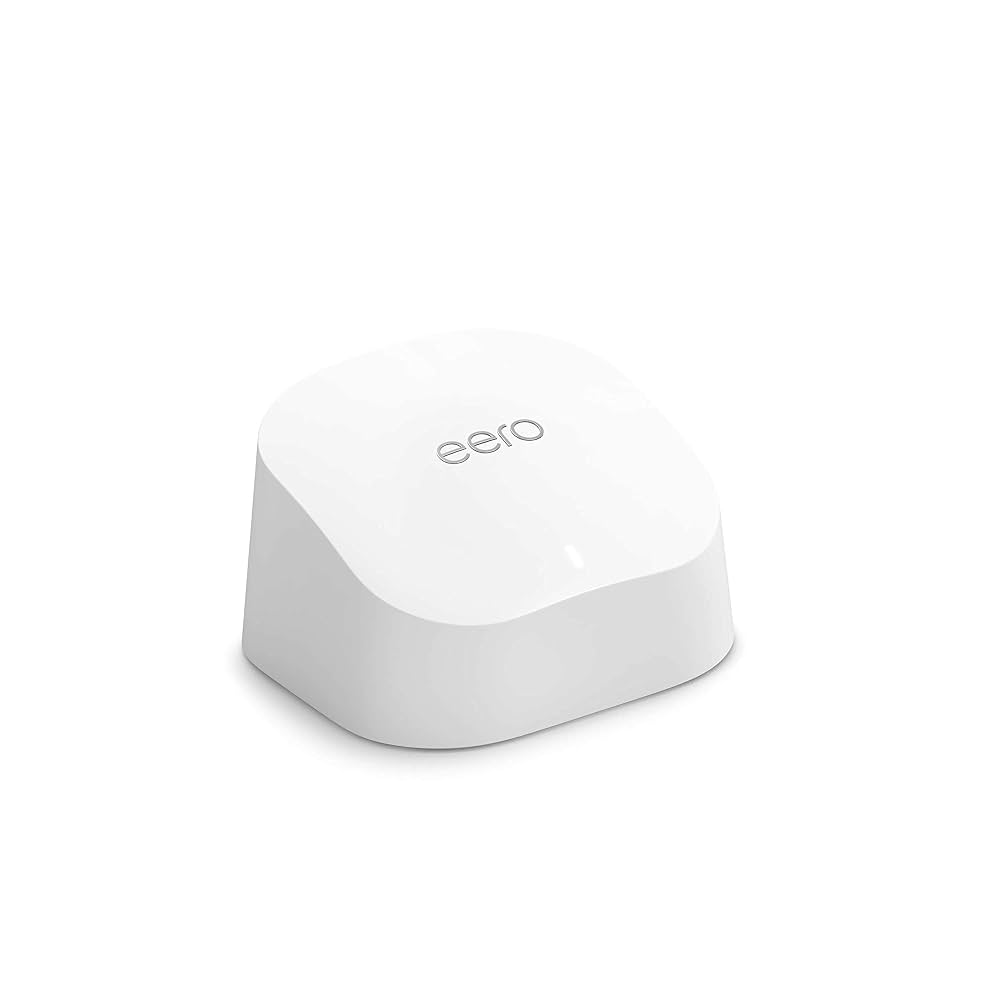
Amazon eero 6+

Fibrus includes good routers, especially from 500Mbps upwards. You get the Wi-Fi 6 eero 6+ with the lower speeds and the Wi-Fi 7 eero 7 with the fastest packages. Two included eeros can improve your coverage without another monthly charge. You can't choose the router, get 6GHz Wi-Fi or pay for a premium upgrade, but you're unlikely to need more unless you want detailed controls or a particular Wi-Fi feature.

7.9 /10
Overall score

Included router value score

This score looks at whether the router you get included feels fair for the package, including the router’s overall quality, Wi-Fi generation, frequency bands and whether the best router is easy to get.

Annual price rises

One of Fibrus's biggest advantages is that your broadband package price stays fixed throughout the minimum term. There's no automatic annual increase to calculate and no April surprise partway through your contract. Your bill can still change if you alter the package or add services, but the contracted broadband price itself stays put.

Why Fibrus avoids the usual annual broadband price rise

The package price is fixed for the minimum term

The monthly broadband price you agree at signup stays exactly the same throughout the minimum term. Fibrus doesn't apply the scheduled annual increase now common elsewhere, so an 18-month contract won't become more expensive when its second April begins.

Extras, package changes and cost-based fees can still alter your total bill. That's different from Fibrus automatically raising the underlying broadband package price each year.

It applies across the residential package range

None of the Fibrus packages we assessed has an annual in-contract price rise. You don't need to choose a special tariff or pay extra for that protection.

The fixed-price protection lasts for your minimum term. Once it ends, your service can continue at a higher standard out-of-contract rate unless you renew or leave.

The simplest price rise is no price rise

You don't have a percentage formula, inflation measure or fixed annual pound increase to calculate. Your package price stays the same throughout the minimum term.

You can compare costs much more easily. Calculate the package price across the full term, then add only the optional services you want.


INTERACTIVE CHART

How much will your bill rise by?

This interactive chart shows how much this provider adds to its package prices each April, and lets you compare that with literally any other provider in our database.

Provider N/A Choose a provider
Provider average N/A The average April price rise among providers that apply one.
Compare provider N/A Choose another provider

Package annual price rises

April price rise shown package by package

Package view

The provider-average benchmark is calculated from each provider that applies an annual price rise. Fixed-price providers are shown in the chart but are excluded from the benchmark.

Fibrus's annual price-rise policy is excellent. Your broadband package price stays fixed throughout the minimum term, so you don't have to budget for an automatic April increase or decipher an inflation formula. Extras and package changes can still alter your bill, but the broadband price you agreed at signup remains predictable until your commitment ends.

10 /10
Overall score

Annual price rises score

This score looks at how a provider’s in-contract annual price rises compare with the wider market, and whether the rules are simple, consistent and easy to understand.

Cost of upgrades and extras

Fibrus sells several useful extras, but this is also where your monthly cost can climb. Additional eeros, a static IP, Fibrus Talk and Fibrus TV can all add recurring charges, while paper billing, missed appointments and payment problems may create separate fees. Separate the services you'll genuinely use from avoidable charges that add nothing to your broadband.

How to calculate the real monthly and occasional Fibrus costs

Start with the package itself

Choose the speed you need before considering TV, phone service, extra eeros or a static IP. Faster isn't automatically better value.

Your broadband package price stays fixed during the minimum term, making it easier to see how much the extras you choose will add each month.

Separate recurring extras from one-off fees

Fibrus TV, Fibrus Talk, additional eeros and a static IP can add ongoing charges, so include each selected service in the monthly total.

Paper bills, late or failed payments, missed appointments and engineer visits caused by something in your home are different. They're avoidable charges, not services that improve your package.

Check how many eeros are included first

Full Fibre 150 starts with one eero, while packages from 500Mbps upwards include two. Test the supplied routers before you pay for another one.

You may also receive a third eero after troubleshooting under the Wi-Fi guarantee if you have an eligible faster package. Use that support before you pay monthly for another mesh router.

Don't assume security or backup is included

You don't get provider security software, provider email or a mobile broadband backup connection with a standard Fibrus package.

If you want those services, you'll need to arrange them elsewhere and include the extra cost when comparing Fibrus with a provider offering a broader bundle.

Pay only for extras that solve problems

A static IP is available if you specifically need one. If you mainly browse, stream and make video calls, you're unlikely to benefit from paying for it.

Fibrus Talk makes sense if you still use a home phone, while Fibrus TV may suit you if you want live channels and apps through one puck.

Start with the fixed broadband price, add the monthly cost of any services you'll use and avoid unnecessary fees by paying on time and keeping appointments. Fibrus offers plenty of extras, but choosing several can turn a simple broadband bill into a much larger monthly commitment.

Try the included eeros before you pay for more

Packages from 500Mbps upwards already include two eeros, and you may receive a third after troubleshooting under the Wi-Fi guarantee. That should solve many weak-room problems without another monthly charge. Don't pay for another eero until you've tested the two included and asked Fibrus about the guarantee.

Fibrus also sells additional eeros, but it doesn't publish an overall limit. You may need more in a very large home, although poor placement can add expense without improving your Wi-Fi coverage. Start with the included eeros and ask Fibrus for help before you pay for another one.

No mobile backup means outages need another plan

Fibrus doesn't sell a mobile broadband backup add-on. The optional battery can keep your router and ONT powered temporarily during a power cut, but it can't replace a failed broadband connection.

If you must stay online for work, you'll need another backup, such as phone tethering or a separate mobile service. Include that extra cost when you compare providers.

Account and appointment fees are the easiest costs to avoid

The terms allow charges for paper billing, late or failed payments, service changes, missed appointments and engineer visits if your router setup or wiring caused the problem. None of these charges improves your broadband, which makes them more irritating than an optional extra you've chosen deliberately.

Direct Debit, online billing, keeping engineer appointments and checking your router before reporting a fault reduce the chance of those fees. Fibrus offers useful add-ons, but avoidable account charges help explain why this area scores much less well than its fixed package pricing.

Fibrus extras and possible charges at a glance

You can extend your Wi-Fi coverage, add a home phone, buy Fibrus TV or request a static IP. Those choices can be useful, but remember to add their monthly prices and any one-off account or appointment fees to your total.

Most likely to matter

Additional eeros

You can pay for another eero, although faster packages already include two and you may receive a third through the guarantee.

Broadband backup

Fibrus doesn't sell mobile broadband backup. The battery option only keeps the router and ONT powered temporarily during a power cut.

Fibrus Talk

Fibrus Talk costs extra, so add it only if you still make or receive home-phone calls.

Worth checking

Security software

You don't get provider security software, and Fibrus doesn't sell it as an add-on. You'll need to arrange your own if you want it.

Fibrus TV

If you choose Fibrus TV, the optional puck combines live TV, streaming apps and cloud gaming. Streaming subscriptions such as Netflix aren't included.

Your own router

You can replace the eero with your own router or use eero bridge mode. Buying another router adds an upfront cost but may give you controls the eero app doesn't offer.

Dead ends

Static IP or premium router

A paid static IP is available, but there's no premium Fibrus router upgrade. The package speed decides whether you receive the eero 6+ or eero 7.

Router choice is simple, extra eeros cost monthly

You don't choose between router models at checkout. Fibrus supplies the eero 6+ or eero 7 according to package speed, which keeps signup simple but gives you no independent router choice.

Amazon eero 6+
Simple choice

Higher speeds include the better router

You get the Wi-Fi 7 eero 7 with the 1Gbps and 2Gbps packages, while the lower-speed packages come with the Wi-Fi 6 eero 6+.

There's no premium router option at checkout, so you only need to decide whether the package speed and its supplied eero suit your home.

The limit

Extra eeros can add to the monthly bill

You already get two eeros with a faster package, and the guarantee may provide a third. Any further eeros add a monthly charge rather than a one-off cost.

That option may help if you have a very large home, but test the included eeros and ask Fibrus for help before you add another monthly charge.

Fibrus's extras are useful but can make your total bill less attractive. You can add eeros, Fibrus Talk, Fibrus TV and a static IP, and several of them add monthly charges. You can't buy mobile broadband backup, provider security software or a premium router upgrade. Paper billing, payment problems, missed appointments and engineer visits caused by something in your home may also lead to avoidable fees. The broadband package price stays predictable, but the total can become expensive once you add several extras.

5.5 /10
Overall score

Cost of upgrades and extras score

This score looks at how close the advertised package price is likely to be to the price you actually pay once useful extras, paid add-ons and missing options are taken into account.

End-of-contract pricing

Fibrus protects you from annual rises during the minimum term, but most packages become more expensive if you let them roll onto the standard rate. Across the five packages we assessed, the average increase is 19%, although the change differs considerably by package. Your service continues monthly, giving you time to decide, but keeping a discounted price normally means starting a new minimum term.

The average rollover rise is noticeable, and some packages jump sharply

Across the five speed packages we assessed, the unweighted average increase at the end of the minimum term is 19%. Use that as a rough guide, not the increase for your exact package. Full Fibre 150 records no rise, while the 2Gbps package rises by considerably more than the average.

Your service doesn't stop when the term ends. It continues monthly at the standard rate until you renew, switch or cancel, so doing nothing can turn a predictable in-contract bill into a more expensive rolling one.

Fibrus should warn you before the new rate begins

Ofcom requires Fibrus to send your end-of-contract notice between 10 and 40 days before the contract ends. We've used 30 days for this review, giving you time to check the renewal offer and compare alternatives.

The notice tells you what your new price will be and gives you time to decide whether to renew, switch or let the service continue monthly.

Online renewal starts another commitment

You can renew online, so you don't have to telephone Fibrus to get another in-contract price. That's particularly helpful when the standard rate is about to begin.

You'll normally need to accept a new minimum term to get another discounted price. Compare the saving with current alternatives before accepting, because a lower monthly bill can still be poor value if the new commitment no longer suits you.

Rolling monthly buys time, not the best price

Your service continues monthly after the minimum term. That can help if you need a little time to arrange a switch, move home or decide which package to take next without committing again.

You'll pay more on most packages for that flexibility. It can be useful for a short period, but the lack of a new commitment doesn't make the rolling price competitive over the long term.

INTERACTIVE TOOL

What could your broadband bill roll on to?

Estimate what your monthly broadband price could look like by the end of your minimum term, and what it will jump to if you let the deal roll over.

Step 1: Choose your provider and package

Start by choosing your broadband provider, then select the package your contract is based on.

Provider
Package

Step 2: Tell us the starting month of your contract and what you pay

Use the first full monthly price before any mid-contract April increases.

Contract start month

Step 3: Estimate the rollover shock

This is an estimate. Your provider’s end-of-contract notice will be the exact figure.

Your estimate

    Where would you like to go next?

    Use the estimator before the minimum term ends

    Choose the Fibrus package, enter the contract start month and use the first full monthly broadband bill. The estimator can then show the likely rollover effect. Remember that 19% is the average across five Fibrus packages, not a promise for your exact one, so use the price in your end-of-contract notice before deciding whether to renew or switch.

    What to do before Fibrus moves you to its standard rate

    1. Read the new monthly price

      Use the end-of-contract notice for the exact standard rate rather than relying only on the provider-wide average.

    2. Confirm the contract end date

      Check the online account or contract so you know the end date before the higher standard rate begins.

    3. Set an early reminder

      Put the date in your calendar before the notice window, leaving enough time to compare, renew or arrange a switch.

    4. Compare current alternatives

      Check Fibrus's renewal offer against current broadband deals with a similar speed, contract length and included routers.

    5. Act before rollover

      Renew, switch or cancel in time. Rolling monthly is useful breathing room, but it's normally the more expensive option.

    A renewal can be worthwhile, but compare before accepting

    Fibrus may offer you a new discounted price as the minimum term approaches, and you can renew online. That's convenient, but the discount normally comes with a fresh minimum term, so you'll have less freedom to leave.

    Compare the renewal price with Fibrus's current packages and other providers offering a similar speed. The 19% average hides wide differences between Fibrus packages, so use the price in your notice rather than assuming your bill will rise by 19%.

    If the renewal offer suits you, another minimum term may be reasonable. If it doesn't, the notice period leaves you time to switch. A slightly cheaper price isn't automatically good value when the contract length, supplied router or service guarantees no longer meet your needs.

    Fibrus handles the end of your contract reasonably well. Your price stays fixed during the minimum term, you can renew online and the service continues monthly if you need time to decide. Most packages move to a higher standard rate, however. The average increase across the five we assessed is 19%, and the 2Gbps package rises by much more. The notice gives you time to avoid that cost, but keeping a discounted price normally means accepting another minimum term.

    7.6 /10
    Overall score

    End of contract pricing score

    This score looks at what happens when your minimum term ends, how much warning you get, and how easy the provider makes it to avoid sliding onto an expensive post-contract price.

    Service guarantees

    Fibrus gives you two useful protections, but neither covers every problem. Your minimum line speed is half the advertised speed, while qualifying faster packages include a 10Mbps room guarantee. If Fibrus can't fix the problem, you may be able to leave without a fee. There's no guaranteed repair deadline, however, and delayed installations or missed appointments aren't automatically compensated.

    The minimum speed promise covers the broadband line itself

    Fibrus publishes a minimum download speed equal to 50% of the advertised package speed. This tests the broadband connection reaching your router, not the speed your phone receives over Wi-Fi in a distant room. Walls, distance and device limits can slow down Wi-Fi even when the line itself meets the minimum.

    If your line remains below the minimum after Fibrus has had 30 days to investigate and fix it, you can leave without an early-exit fee. That gives you a genuine way out, although one disappointing home speed test on its own doesn't give you an immediate right to cancel.

    Fibrus gets time to investigate before you can leave

    You need to report the slow speed and allow Fibrus to troubleshoot it. Fibrus then has 30 days to fix the problem. If your broadband line still falls below its minimum after that, you can leave without an early-exit fee.

    Weak Wi-Fi in one room follows a different guarantee. On eligible packages from 500Mbps upwards, Fibrus promises at least 10Mbps in qualifying rooms. It can reposition your eeros, provide another one and arrange an engineer visit. If the room still misses the target after that, you can leave without a fee.

    INTERACTIVE TOOL

    Are you getting your minimum guaranteed speed?

    Choose your provider and package, then run a speed test. For the cleanest test of the broadband speed coming into your home, plug a laptop or desktop directly into your router with a LAN cable. You can also test on a phone or tablet to check Wi-Fi speed, but make sure mobile data is switched off first.

    Choose your provider and package

    Choose your provider and package so we can compare the test result with the package's minimum guaranteed download speed.

    Provider
    Package

    Before you test

    For an absolute line-speed check, use a computer connected to the router by Ethernet. If you test over Wi-Fi, the result may reflect your in-home Wi-Fi as much as the broadband line itself.

    Run the speed test

    Upload — Mbps
    Latency — ms

    Ready. Select a package, tick the data policy box, then run the test.


    Your result

    Result waiting Run the speed test to compare your download speed with the selected package’s minimum guaranteed speed.

      Where would you like to go next?

      This tool uses M-Lab’s open measurement platform. A single speed test is a useful check, but it is not a formal fault diagnosis.

      How the different Fibrus service protections fit together

      Start by working out whether the problem affects the broadband line, Wi-Fi inside your home or the connection. Each follows a different process.

      The reported problem

      Your broadband is below the package minimum, one room has weak Wi-Fi or the whole connection has stopped.

      Line-speed protection

      Fibrus records a minimum download speed equal to 50% of your package's advertised speed. Report a persistent shortfall and allow 30 days for investigation. If Fibrus can't restore the connection above that minimum, you can leave without an early-exit fee. This protection concerns the line reaching your router, not every Wi-Fi device around your home.

      The whole-home Wi-Fi protection

      Full Fibre 500 and faster packages include a 10Mbps guarantee in qualifying rooms. Fibrus first checks your eero placement, can provide a third eero and may arrange an engineer visit. If the promise still isn't met, you can leave without a fee. Full Fibre 150 doesn't include this guarantee, so its single eero isn't backed by the same room-by-room Wi-Fi promise.

      Fault and outage protection

      Fibrus doesn't guarantee that your fault will be repaired within a fixed time and isn't a member of Ofcom's Automatic Compensation Scheme. Fibrus starts paying its own compensation after you've had a total loss of service for 48 hours, but that isn't a promise to repair the fault within 48 hours. Delayed installations and missed appointments aren't automatically compensated.

      What to expect

      Keep your speed-test results and follow Fibrus's troubleshooting process from the beginning. You can only leave without a fee after Fibrus has had the time or taken the steps allowed under the relevant guarantee.

      Fibo investigating a website bug or mistake

      The room guarantee only covers faster packages

      The Total Home Wi-Fi Guarantee sets a clear target of at least 10Mbps in qualifying rooms. Fibrus can reposition your eeros, provide a third one and send an engineer. If the room still misses the target after that, you can leave without a fee.

      You therefore get several attempts to fix an unusable room before having to cancel. Full Fibre 150 doesn't include the same promise, and property eligibility rules apply, so your postcode and home layout still matter.

      Fibrus's service guarantees help, but they don't cover every problem. You may leave without a fee if Fibrus misses the 50% minimum line speed after 30 days. Faster packages also include a 10Mbps room guarantee, another eero and an engineer visit. There is no guaranteed repair deadline, and compensation for delayed installation or a missed appointment isn't automatic. The process differs for slow broadband, weak Wi-Fi in one room and a complete outage.

      6.5 /10
      Overall score

      Service guarantees score

      This score reflects how much protection you get when your broadband speed, Wi-Fi, installation, repair or service reliability doesn’t meet expectations.

      Some links on this page may earn us a small commission if you click through and buy. This never affects either what you pay, or our scores and recommendations. If, however, you’d rather bypass affiliate links, use this direct Fibrus link instead.

      Illustration of Fibo representing direct links to broadband providers