
REBEL INTERNET VALUE FOR MONEY REVIEW
Rebel Internet value for money: How good is it?
Rebel Internet is perhaps the best example of where the monthly price doesn’t dictate its value for money. Rebel is pricey, but it’s as much about what you get as what you pay, so the question is actually whether it’s worth the premium or not.

Having trouble choosing a broadband provider?
No single best provider or package exists – only the best pick for you personally. Fibredog’s YourMatch™ system uses thousands of provider metrics and a lot of maths to find you your perfect match.
Rebel Internet Value for Money Scorecard
Six key areas. One overall score. All calculated using our transparent methodology.
What you get as standard
The features, equipment and services included as standard, before paid add-ons, premium tiers or optional upgrades are added.
Included router quality
How much value the included router adds to the package, including Wi-Fi standard, ports, coverage and overall hardware quality.
Annual price rises
How clearly annual price rises are explained, how predictable they are, and how much they add during the minimum term.
Cost of upgrades and extras
Which useful extras cost more, which are bundled in, and whether upgrades feel sensible or too easy to overspend on.
End-of-contract pricing
What happens when the minimum term ends, whether the price jumps, and how easy it is to avoid poor rollover value.
Service guarantees
The service guarantees, speed promises, compensation rules and fault protections that apply when the connection underperforms.
Fibredog Router Comparison Tool
Compare this provider's routers with each other, or with any other national provider.
Fibredog Annual Price Rise Comparison
See how much each of these provider's packages will go up every April and compare that to any other provider.
Fibredog Rollover Price Calculator
Tell us who you're with and what you're paying and we will tell you how much your price will go up when your contract ends.
Fibredog Speed Guarantees Test
Tell us who you're with and we will check if they're delivering you the minimum speed they promised.
Included router value
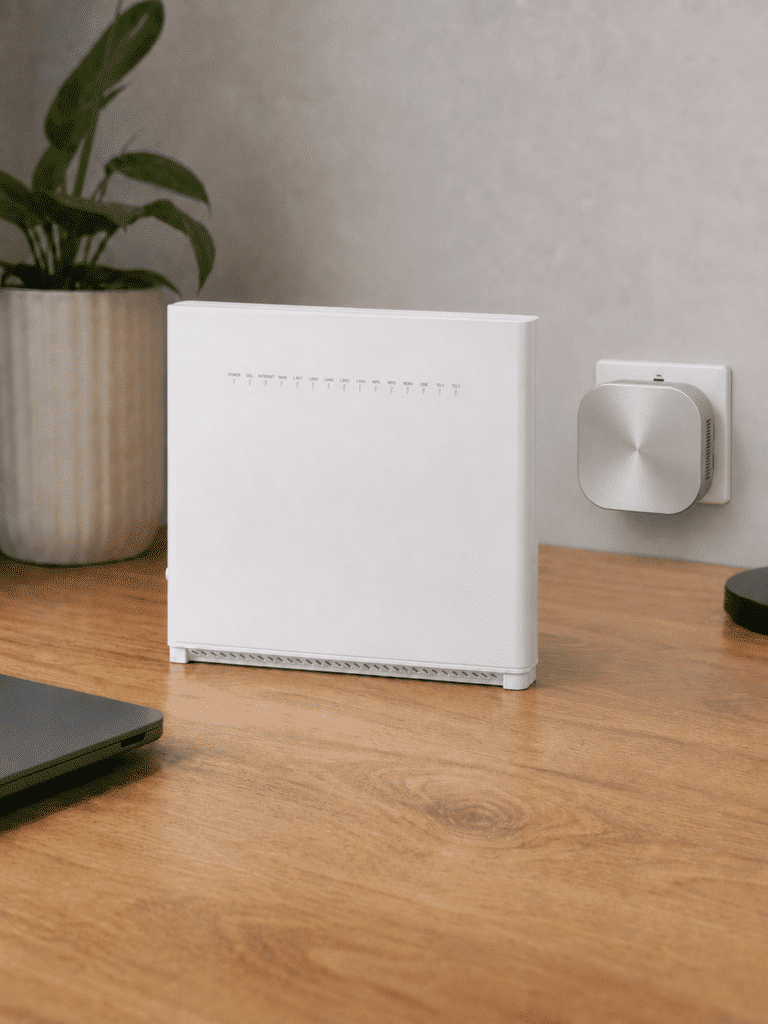
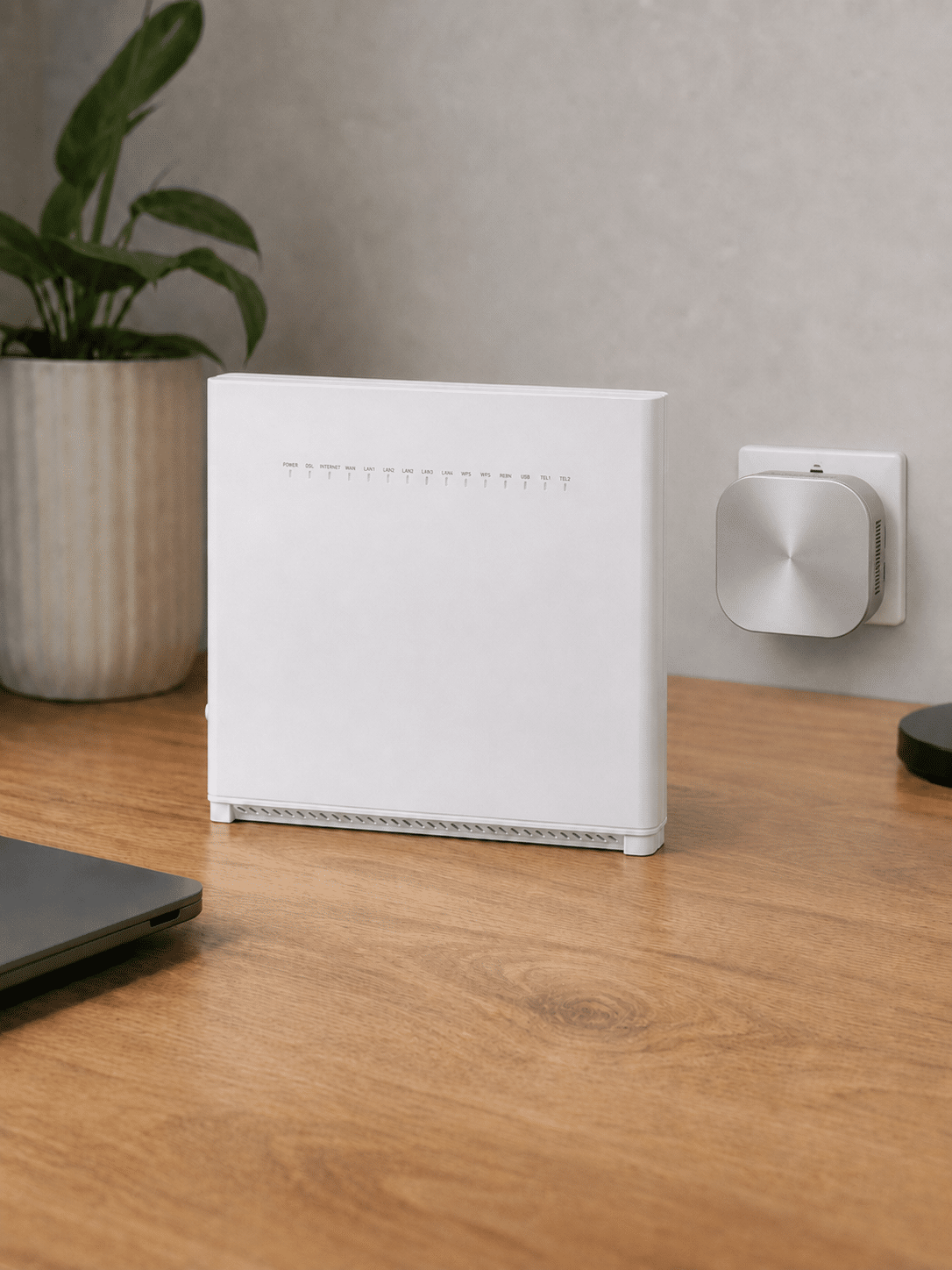
Every Rebel package comes with the R1 Router. There’s no inferior version for cheaper packages and no premium model kept aside as an upgrade. It’s a good Wi-Fi 6 router with useful controls, plenty of wired connections and security included from day one.
Rebel has one router – and it’s a good one
The R1 won’t struggle in a busy home
The R1 uses Wi-Fi 6 and is well equipped for homes where lots of phones, laptops, TVs and other devices are online together. It updates itself automatically, includes guest Wi-Fi and parental controls, and protects against malicious websites. This isn’t groundbreaking stuff, but it’s everything a decent modern router should provide.
You get four wired connections
Four Gigabit Ethernet sockets give you plenty of room for TVs, games consoles, computers and anything else you’d rather connect by cable. The Full Fibre connection has its own separate input, so it doesn’t pinch one. There’s no faster socket, however, which slightly lets down the otherwise impressive Rebel 1000 package.
The Plume app is more useful than most
The Plume Home app lets you see what’s connected, pause internet access, set parental controls and create a separate guest network. More unusually, you can tell it which devices or activities matter most. Prioritising your work laptop, video call or games console can stop less important traffic from getting in the way when your home network is busy.
It doesn’t turn the R1 into a specialist gaming router, but it’s a useful feature that many provider routers don’t have. The app also manages Rebel’s paid SuperPods if you later need better coverage around your home.
Sources: Rebel Internet, Heights Telecom
INTERACTIVE TOOL
Compare routers from any provider
This provider’s routers are pre-selected for comparison with one another. However, you can use this tool to compare any router from any major provider using the dropdown menus below.
| Feature | Choose router | Choose router |
|---|---|---|
| Fibredog rating | — | — |
| Router included as standard | — | — |
| Router manufacturer | — | — |
| Router model | — | — |
| Wi-Fi standard | — | — |
| Wi-Fi bands | — | — |
| 2.4GHz supported | — | — |
| 5GHz supported | — | — |
| 6GHz supported | — | — |
| Beamforming | — | — |
| Antenna count | — | — |
| Maximum connected devices | — | — |
| Stated coverage | — | — |
| Total Ethernet ports | — | — |
| MU-MIMO | — | — |
| OFDMA | — | — |
| WPA3 security | — | — |
| Guest network | — | — |
| Antenna type | — | — |
| Gigabit Ethernet ports | — | — |
| 2.5Gb Ethernet ports | — | — |
| 5Gb Ethernet ports | — | — |
| 10Gb Ethernet ports | — | — |
| WAN port speed | — | — |
| USB ports | — | — |
| Telephone ports | — | — |
| ONT Ethernet input | — | — |
| Coaxial input | — | — |
| Power connection | — | — |
| Mesh support | — | — |
| Provider mesh product | — | — |
| Third-party router use | — | — |
| Modem mode | — | — |
| Compatible broadband technology | — | — |
| App management | — | — |
| Parental controls | — | — |
| QoS | — | — |
| Automated QoS | — | — |
| Device prioritisation | — | — |
| Anti-bufferbloat controls | — | — |
| Manual queue management (SQM/CAKE) | — | — |
| Smart channel selection | — | — |
| Security features | — | — |
| Gamer mode | — | — |
| Game traffic prioritisation | — | — |
| Gaming QoS profiles | — | — |
| Server ping routing tools | — | — |
| Latency dashboards | — | — |
| Per-device gaming presets | — | — |
| Gaming VPN routing features | — | — |
| Work from home mode | — | — |
| Automatic firmware updates | — | — |
| Firmware update notes | — | — |
| Router height | — | — |
| Router width | — | — |
| Router depth | — | — |
| Router weight | — | — |
| Power consumption | — | — |
| Router orientation | — | — |
| Wall mountable | — | — |
| Router colour | — | — |
| Self-installation | — | — |
| Browser admin interface | — | — |
| WPS | — | — |
| Status light control | — | — |
| Reset button | — | — |
| Wi-Fi on/off button | — | — |
| Where would you like to go next? | See all tools | See all tools |
Which Rebel Internet router do you get?
Rebel R1 Router
Included with every Rebel broadband package unless you opt to use your own router.
The R1 is a dual-band Wi-Fi 6 AX5400 router with WPA3, four Gigabit LAN ports and automatic network optimisation.
Rebel SuperPods
Optional mesh units extend the R1's coverage around the home.
They work with the R1 through Rebel's Plume-managed system, but they improve coverage rather than replace the main router.
Bring your own router
You can decline the R1 and use compatible third-party equipment.
Rebel publishes the required setup details, although its SuperPods cannot be used with a customer-owned router.
Is Rebel’s included router good value for money?
Yes. Rebel could easily have supplied a cheaper router with lower-speed packages and used the R1 to tempt people into paying more. Instead, everyone gets Wi-Fi 6, four usable wired sockets, automatic security and the same set of app controls. That immediately makes the deal more generous than those from providers still handing out old or deliberately limited equipment.
There are compromises. The lack of a faster wired socket means Rebel 1000 may or may not be able to show its full speed to one device by cable, since Gigabit Ethernet ports usually top out around 900-940Mbps in practice. SuperPods cost extra if the R1 can’t cover your whole home. Neither is a serious problem for most people. The R1 is a capable router, you get it with every package and there’s no upgrade nonsense to navigate.
Having trouble choosing a broadband provider?
No single best provider or package exists – only the best pick for you personally. Fibredog's YourMatch™ system uses thousands of provider metrics and a lot of maths to find you your perfect match.
Rebel starts with its best router, then adds mesh
Every customer taking Rebel equipment receives the same R1 Wi-Fi 6 router. There is no premium main-router tier; the paid upgrade route extends coverage with Plume SuperPods.
The best main router is already included
The R1 provides Rebel's core Wi-Fi, Plume management, optimisation and Guard security without requiring a faster package or premium-router fee.
Rebel offers only this provider-supplied router, although customers can decline it and bring compatible equipment.
Pay per pod to extend coverage
No pod is included. Rebel charges £5 per month for each SuperPod added to its managed mesh system.
The pods work coherently with the R1, but carry no measurable whole-home guarantee and cannot be used with a customer-owned router.
What to do when your Rebel Internet minimum term ends
-
Confirm your current monthly total
Add the broadband price and any SuperPods, Home Phone or static-IP charge. Rebel does not schedule annual increases during the minimum term.
-
Read Rebel's notice
Check the end date and any contract options in Rebel's notification, even though the core monthly broadband price is intended to remain unchanged.
-
Understand the fixed-price rollover
Rebel says the same monthly price continues after the minimum term. There is no automatic standard-rate jump and no need to recontract merely to preserve a discount.
-
Compare flexibility as well as price
Check current Rebel and competitor offers, but account for the value of remaining on a rolling basis without accepting another long minimum term.
-
Continue, recontract or switch
Choose deliberately. You can keep the rolling service at the same monthly price, select a new term if it benefits you, or switch after giving the required notice.

You do not need to recontract to keep your price
Rebel's fixed-price proposition is different from the usual rollover model. It says the same monthly broadband price continues after the minimum term, so there is no automatic standard-rate jump forcing you to accept another long agreement.
You should still compare current Rebel and competitor offers, particularly if your speed, SuperPod or Home Phone needs have changed. But remaining on the rolling service can be valuable in its own right because it preserves flexibility without a loyalty penalty.
Do not surrender flexibility for a token saving: Judge any new-term offer against Rebel's unchanged rolling price and the wider market. A recontract is worthwhile only if the benefit genuinely compensates for accepting another minimum term.

How Rebel Internet service guarantees work in practice
Rebel offers useful diagnostics and personal support, but its formal service guarantees are much thinner than those of the large providers.
The problem
Your Rebel connection is slow, unavailable or weak in part of the home. Diagnose whether the failure is the incoming service, the R1 router or Wi-Fi coverage before requesting help.
Layer 1: the contract
Rebel must provide the service with reasonable care and skill and investigate reported faults. It is not a member of the automatic compensation scheme and publishes no general fixed repair-time guarantee.
Layer 2: no minimum-speed exit guarantee
Rebel's 20Mbps wording is an address eligibility rule used before supplying service, not a contractual minimum-speed remedy. It does not provide a published repair window followed by an automatic right to leave when the live connection falls short.
Layer 3: no whole-home Wi-Fi guarantee
Rebel sells managed SuperPods for £5 per month each, but does not promise a measurable minimum speed in every room, a guarantee-led remediation process or compensation if coverage remains inadequate.
What this means
Rebel's Plume diagnostics and callback model may still resolve problems effectively, but they are support tools rather than formal guarantees. Report the fault digitally, keep a written record and use the complaints process if it remains unresolved.

Having trouble choosing a broadband provider?
No single best provider or package exists – only the best pick for you personally. Fibredog's YourMatch™ system uses thousands of provider metrics and a lot of maths to find you your perfect match.
Some links on this page may earn us a small commission if you click through and buy. This never affects either what you pay, or our scores and recommendations. If, however, you’d rather bypass affiliate links, use this direct Rebel Internet link instead.
