
BT BROADBAND VALUE FOR MONEY REVIEW

BT Broadband value for money: How good is it?

BT’s value for money proposition is interesting. Because in our view, it’s not offering a whole lot that’s either unique or particularly premium for the money it’s asking. There’s a lot of detail behind that statement, of course – so let’s get into it.


By Data checked  Checked weekly
The fibredog mascot – a dog – standing over s set of scales, weighing a stack of coins against BT Broadband routers and equipment, representing value for money.
fibredog mascot wearing a headset

Having trouble choosing a broadband provider?

No single best provider or package exists – only the best pick for you personally. Fibredog’s YourMatch™ system uses thousands of provider metrics and a lot of maths to find you your perfect match.

BT Broadband Value for Money Scorecard

Six key areas. One overall score. All calculated using our transparent methodology.

What you get as standard

The features, equipment and services included as standard, before paid add-ons, premium tiers or optional upgrades are added.

7.0/10

Included router quality

How much value the included router adds to the package, including Wi-Fi standard, ports, coverage and overall hardware quality.

8.1/10

Annual price rises

How clearly annual price rises are explained, how predictable they are, and how much they add during the minimum term.

6.8/10

Cost of upgrades and extras

Which useful extras cost more, which are bundled in, and whether upgrades feel sensible or too easy to overspend on.

5.3/10

End-of-contract pricing

What happens when the minimum term ends, whether the price jumps, and how easy it is to avoid poor rollover value.

8.1/10

Service guarantees

The service guarantees, speed promises, compensation rules and fault protections that apply when the connection underperforms.

8.2/10

What you get as standard

BT gives you a useful starting bundle, but we still wouldn't call it generous. The standard package includes the Smart Hub 3, BT app controls, parental controls, guest Wi-Fi, router security, automatic firmware updates and Cyber Threat Protect. The juicier stuff, like Complete Wi-Fi, Hybrid Connect and Home Tech Expert is going to cost you extra.

BT gives you the basics, with whipped cream on top

The Smart Hub 3 is the router new BT Broadband customers get. It has Wi-Fi 6, dual-band Wi-Fi, four Gigabit Ethernet ports, a 2.5Gbps WAN port and a browser admin page. It's perfectly decent, but it hardly sets the world on fire. Wi-Fi 6, in 2026, should be considered the average unlike a few of years ago when it was cutting edge.

Cyber Threat Protect is more interesting, because BT includes it for free in all of its packages, and says it covers up to 15 devices once you've activated it. You also get parental controls, guest Wi-Fi and automatic router updates. Useful stuff, yes. Lavish, no.

BT doesn't exactly chuck in the kitchen sink

BT doesn't include a landline as standard, and new customers don't get a BT email address as standard either. BT's Hybrid Connect broadband backup system also doesn't come free. So if you expected BT to chuck in a dizzying array of freebies, this is where that idea quietly leaves the room.

Complete Wi-Fi is the big missing extra for homes with weak rooms – and its lack of inclusion as standard is a bugbear not just for BT, but for most providers. We here at fibredog strongly believe that broadband provision as a whole needs to include competent Wi-Fi that reaches every room in your house, without asking for more money.

Full Fibre 1 isn't as bare bones as you might assume

BT's entry-level Full Fibre package, Full Fibre 1, still gives you the Smart Hub 3, BT app controls, parental controls, guest Wi-Fi, router security and Cyber Threat Protect. For a cheap package, that's a decent start. You're not buying a shell and then paying to make it work.

The speed is the bigger limit. Full Fibre 1 is the 50Mbps package in BT's current line-up, so it suits lighter homes better than busy ones. Browsing, streaming and ordinary admin are fine. Big households should look further up the range.

Faster packages mostly just buy you faster broadband

BT's Full Fibre range runs from Full Fibre 1 through to Full Fibre 900. As you move up, the obvious change is speed, but unlike some providers not a sudden pile of premium extras a the top end. BT doesn't become wildly more generous just because the number on the package gets bigger. And we kinda like that.

Because it keeps the decision simpler. Pick the speed your home actually needs, then check which extras are included and which ones cost more. Complete Wi-Fi matters if signal struggles to reach specific rooms. Hybrid Connect matters if mobile-network backup is something you feel is worth paying for.

AT A GLANCE

What you get with BT Broadband

Here’s what's included as standard, what may cost extra, and what's only free on top-end packages.

Feature
On all standard packages
Paid extra
Free on highest speed packages
Landline
No
Yes
No
App management
Yes
No
Yes
Parental controls
Yes
No
Yes
Guest network
Yes
No
Yes
Router security features
Yes
No
Yes
Automatic firmware updates
Yes
No
Yes
Wi-Fi guarantee
No
Yes
Yes
Mesh devices
No
Yes
Yes
Security software
Yes
No
Yes
Provider email
No
No
No
Broadband backup
No
Yes
No

Standard kit versus paid extras

This table separates everyday included features from extras that may depend on package tier, router choice or paid add-ons.

Good to know: Included features are easier to compare because you won’t need to budget for them separately.

Worth checking: Some useful extras may only be included on selected packages or as paid add-ons.

BT does the everyday stuff properly. The Smart Hub 3, BT app controls, parental controls, guest Wi-Fi, router security, automatic firmware updates and Cyber Threat Protect are all included. That gives you a decent starting point, not a luxury bundle.

Complete Wi-Fi and Hybrid Connect are where BT starts asking for more money. The table tells the story neatly enough. BT covers the basics, then charges for the bits that help when Wi-Fi coverage or downtime becomes the problem.

How to work out if BT Broadband extras are worth it

  1. Pick your speed first

    Choose the Full Fibre speed you need before you look at extras. Faster broadband still won't fix a weak Wi-Fi room.

  2. Check what's already included

    BT's Smart Hub 3 is the current new-customer router, and Cyber Threat Protect is included, so don't pay twice for the same problem.

  3. Price up the real gaps

    Complete Wi-Fi, broadband backup and Home Tech Expert are the extras to check if coverage, outage cover or setup help matter.

  4. Read the Wi-Fi promise properly

    Complete Wi-Fi is a room-coverage promise, not a published Mbps guarantee. Useful, yes, but not magic speed in every corner.

  5. Skip dead-end upgrades

    BT doesn't sell a paid premium router or static IP on normal home broadband, so spend only on extras that solve a real problem.

BT gives you a decent standard bundle rather than a luxury one. Smart Hub 3, app controls, parental controls, guest Wi-Fi, router security, automatic firmware updates and Cyber Threat Protect are included, even on Full Fibre 1. Complete Wi-Fi and Hybrid Connect are where BT starts charging more, so the real check is whether coverage or backup solves a problem you actually have.

7.0 /10
Overall score

What you get as standard score

This score looks at the useful extras included before you start paying more, including router controls, security features, Wi-Fi help, backup options and everyday add-ons.

Included router value

BT's included router is fine, and we don't mean that as an insult. The Smart Hub 3 gives you Wi-Fi 6, WPA3, guest Wi-Fi, BT app controls, parental controls and automatic updates. It will suit normal browsing, streaming, video calls and gaming. But it isn't a reason to say BT is brilliant value.

Sure, the Smart Hub 3 does the job

BT Broadband's router does the job, and not much more

The Smart Hub 3 is the router all new BT Broadband customers will get. It has Wi-Fi 6, 2.4GHz and 5GHz bands, seven internal antennas, WPA3, guest Wi-Fi, a browser admin page and BT app controls. You also get four Gigabit Ethernet ports and a 2.5Gbps WAN port for the input coming from the wall. Decent, yes. World on fire, no.

There isn't a premium BT router option

BT doesn't give you a router upgrade option, which is good in as much as it keeps things simple, but there's always the risk the Smart Hub 3 won't be enough if your needs are particularly demanding. Everyone gets the same one, so credit for simplicity, but you'll need to buy your own router if you need better performance or features.

The trade-off is simplicity

Complete Wi-Fi/Complete Wi-Fi Plus is the best route if the Smart Hub 3 can't reach one or two awkward rooms. But standard packages don't include it, and BT's router-only coverage isn't backed by a published whole-home Wi-Fi speed promise.

BT also doesn't publish a maximum connected-device figure – though around a hundred devices is generally recognised to be about right – and there are no gamer modes, manual device priority, gaming QoS profiles or anti-bufferbloat controls. You'll be fine for ordinary home broadband and general gaming. But the Smart Hub 3 isn't quietly punching above its weight. It's BT's free router, doing a good job at being a free router.

INTERACTIVE TOOL

Compare routers from any provider

This provider’s routers are pre-selected for comparison with one another. However, you can use this tool to compare any router from any major provider using the dropdown menus below.

Feature Choose router Choose router
Fibredog rating
Router included as standard
Router manufacturer
Router model
Wi-Fi standard
Wi-Fi bands
2.4GHz supported
5GHz supported
6GHz supported
Beamforming
Antenna count
Maximum connected devices
Stated coverage
Total Ethernet ports
MU-MIMO
OFDMA
WPA3 security
Guest network
Antenna type
Gigabit Ethernet ports
2.5Gb Ethernet ports
5Gb Ethernet ports
10Gb Ethernet ports
WAN port speed
USB ports
Telephone ports
ONT Ethernet input
Coaxial input
Power connection
Mesh support
Provider mesh product
Third-party router use
Modem mode
Compatible broadband technology
App management
Parental controls
QoS
Automated QoS
Device prioritisation
Anti-bufferbloat controls
Manual queue management (SQM/CAKE)
Smart channel selection
Security features
Gamer mode
Game traffic prioritisation
Gaming QoS profiles
Server ping routing tools
Latency dashboards
Per-device gaming presets
Gaming VPN routing features
Work from home mode
Automatic firmware updates
Firmware update notes
Router height
Router width
Router depth
Router weight
Power consumption
Router orientation
Wall mountable
Router colour
Self-installation
Browser admin interface
WPS
Status light control
Reset button
Wi-Fi on/off button
Where would you like to go next? See all tools See all tools

How BT decides which router you get

BT Broadband packages

You get the Smart Hub 3.

BT's current new-customer router is the Smart Hub 3. There isn't a second BT router to pick at checkout.

Want a BT upgrade?

There isn't a paid premium router.

Higher speeds don't unlock a fancier BT router. The router choice stays simple: Smart Hub 3 is the BT-supplied option.

Want something different?

Use your own router instead.

That is the real alternative if you want more control, but it means more setup and more troubleshooting than using BT's router.

Is the Smart Hub 3 good value for money?

Not really. The Smart Hub 3 is a perfectly decent free router, but that’s as far as the praise should go. It gives you Wi-Fi 6, sensible app and browser controls, parental controls, guest Wi-Fi and enough wired ports for normal homes. Fine. Useful. Completely acceptable. But in 2026, especially next to what EE, BT’s sister company, is putting out, it’s just not quite up there.

While EE’s handing out Wi-Fi 7 as standard, as well as a much more serious Pro option above it, BT gives everyone the Smart Hub 3 and stops there. There’s no premium BT router to move up to, no 6GHz band, and no obvious gamer or device-priority controls. Most people won’t need to replace it. They also shouldn’t pretend it’s doing anything special. It's 'fine'. There's that word again. But honestly, it's the best single word available to sum this router up.
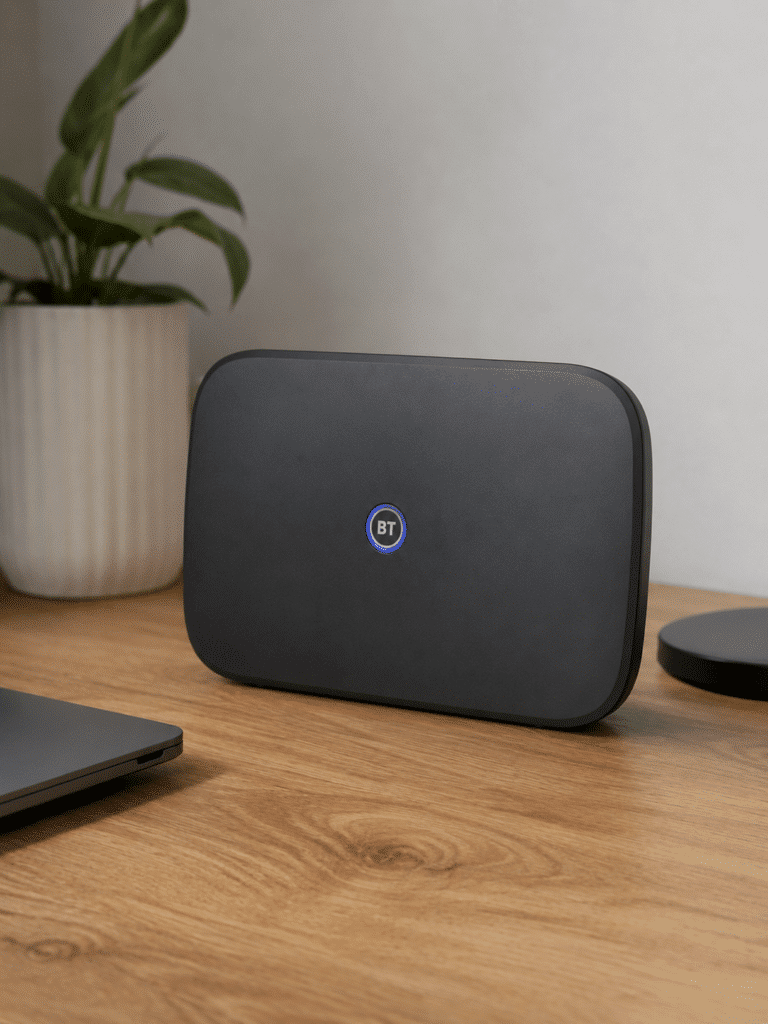
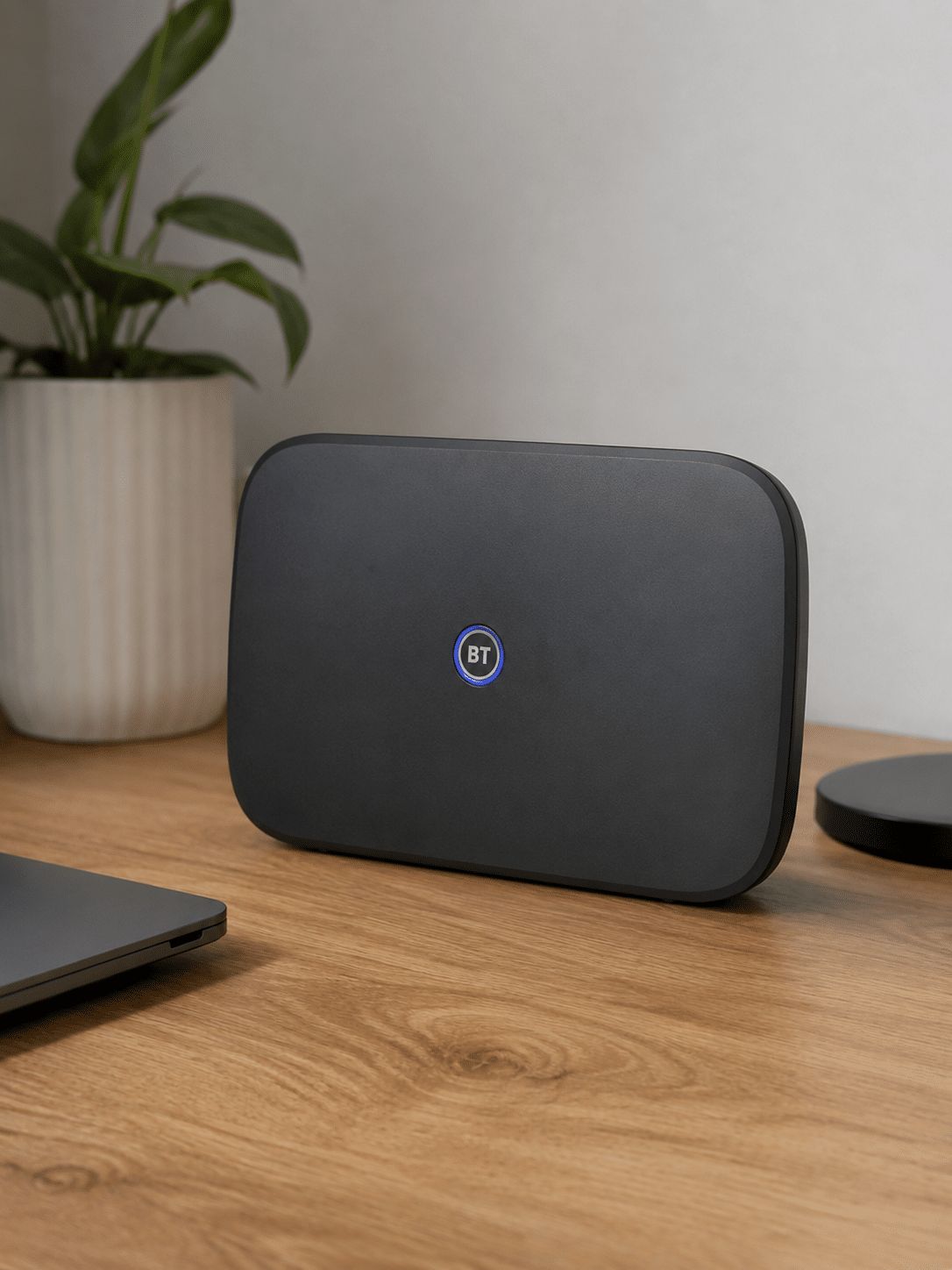
the BT Smart Hub 3, sitting on a  desk with a plant and a laptop

BT's router value is more 'good' than dazzling. Every new BT Broadband customer gets the Smart Hub 3, with Wi-Fi 6, WPA3, guest Wi-Fi, app controls, parental controls and enough wired ports for ordinary homes. It's a perfectly capable bit of kit. But there's no premium BT router to move up to, no 6GHz band, and no obvious gamer or device-priority controls that might add up to making the Smart Hub 3 a bit of a banger.

8.1 /10
Overall score

Included router value score

This score looks at whether the router you get included feels fair for the package, including the router’s overall quality, Wi-Fi generation, frequency bands and whether the best kit is easy to get.

Annual price rises

BT’s broadband pricing is easy to understand, which isn’t the same as easy to love. BT shows the annual rise as a fixed pounds-and-pence amount before you sign up. For BT Broadband, that means your package price goes up by £4 a month each April, or £48 more per year after each rise.

Why does the cost of BT Broadband go up every year?

Because BT builds the April rise into your contract

BT’s April rise is part of the contract from the start. The monthly price you see when you sign up is the starting price, not the price you’ll pay for the whole 24-month term. Once April arrives, BT adds the fixed annual increase shown in the package terms. For the broadband packages in this section, that’s £4 a month.

That's clearer than hiding the rise behind percentage maths. It's also still a price rise. The number's easy to understand, but the result is exactly the same. Your package gets more expensive as you go.

Who does it apply to then?

Anyone still inside a BT Broadband contract when April comes around gets hit by it. Sign up to a 24-month package and the second year usually costs £48 more than the first year before extras, add-ons or package changes get involved.

It’s not a penalty, and it isn’t a one-off charge. It’s just BT’s published annual rise doing exactly what BT told you it would do.

Clarity helps, but it doesn’t make BT any cheaper

BT gets credit for showing the increase clearly. You can see the £4 April rise before you commit, rather than discovering a percentage calculation later. That doesn’t make the advertised monthly price the full contract cost.

A package that looks reasonable at checkout can feel less reasonable after one April rise, and even worse after two. Before you pick BT, do the boring maths. The boring maths are where the real price lives.


INTERACTIVE CHART

How much will your bill rise by?

This interactive chart shows how much this provider adds to its package prices each April, and lets you compare that with literally any other provider in our database.

Provider N/A Choose a provider
Provider average N/A The average April price rise among providers that apply one.
Compare provider N/A Choose another provider

Package annual price rises

April price rise shown package by package

Package view

The provider-average benchmark is calculated from each provider that applies an annual price rise. Fixed-price providers are shown in the chart but are excluded from the benchmark.

BT's annual price rise is clear, but clear doesn't mean cheap. The package price goes up by £4 a month each April, so the second year of a 24-month deal usually costs £48 more before extras, add-ons or package changes get involved. You see the rise before signing up; you still need to do the boring maths before checkout.

6.8 /10
Overall score

Annual price rises score

This score looks at how a provider’s in-contract annual price rises compare with the wider market, and whether the rules are simple, consistent and easy to understand.

fibredog mascot wearing a headset

Having trouble choosing a broadband provider?

No single best provider or package exists – only the best pick for you personally. Fibredog's YourMatch™ system uses thousands of provider metrics and a lot of maths to find you your perfect match.
Cost of upgrades and extras

BT’s paid extras are less about luxury and more about filling gaps you may actually care about. Complete Wi-Fi is the obvious one if your router doesn’t reach every room. Hybrid Connect is there if you want mobile-network backup. Home Tech Expert, landline and call packages sit around the edges. None of it's confusing, but some of it can turn out to be necessary.

How to work out what your BT Broadband package will actually cost

Start with the speed, not the extras

BT's monthly price starts with the Full Fibre speed you choose. Pick the speed your home actually needs before you get distracted by add-ons.

The router choice is simple because new BT Broadband customers get the Smart Hub 3. Faster packages buy faster broadband, not a secret premium router hiding further up the page.

Add the April rise before you compare

BT's package price goes up by £4 a month each April. That is clear before you sign up, but it still changes the real contract cost.

On a 24-month deal, the second year usually costs £48 more before extras, package changes or add-ons get involved. The checkout price is only the opening number.

Price up Wi-Fi and backup separately

Complete Wi-Fi is the main extra if the Smart Hub 3 can't reach awkward rooms. Hybrid Connect is the backup route if losing broadband would cause real trouble.

Both can be useful, but neither should be added by reflex. Complete Wi-Fi is about room coverage, not a published Mbps promise, and backup only earns its keep if downtime would hurt.

Don't pay again for included security

BT includes Cyber Threat Protect for broadband customers, although you still need to activate or download it where required.

That makes the security part easier than it looks at checkout. Check what you already get before you pay for another security product doing the same job.

Skip the extras BT doesn't sell

BT doesn't offer a paid premium router or static IP on normal home broadband, so there is no point hunting for either at checkout.

If you want more router control, your own router is the real alternative. That can work, but it also makes setup and troubleshooting more your problem.

Remember: Choose the BT speed you need, add the April rise, then check whether Complete Wi-Fi, Hybrid Connect or Home Tech Expert solve a real problem. The cheapest-looking package is not always the cheapest once the useful extras join the bill.

Complete Wi-Fi is the extra most homes will look at first

Complete Wi-Fi is BT’s whole-home Wi-Fi add-on. It’s there for the rooms where the Smart Hub 3 signal starts to fade, and it brings BT’s Wi-Fi guarantee with it. Standard packages don’t include mesh devices, so if your home has one or two awkward rooms, this is probably the add-on you’ll end up looking at first.

It’s useful, but we’re still going to grumble about it a bit. Good Wi-Fi around the home feels like a standard part of what broadband provision should be, not a luxury extra. BT isn’t alone here, but paying more because their supplied router can’t reach your back bedroom isn't a great look in all honesty.

Hybrid Connect is useful, but the message is weird

Hybrid Connect is BT’s broadband backup option. If your main broadband connection goes down, it uses EE’s mobile network to keep you online. That’s genuinely useful if you work from home or just don’t want the whole house grinding to a halt because the line has fallen over.

But what idea is BT really selling? You’re paying extra every month because your BT broadband might stop working? It reads less like peace of mind insurance and more like a protection racket.

Home Tech Expert is for a specific type of customer

Home Tech Expert is the add-on for people who want hands-on help with their broadband at home. It can make sense if you struggle with router setup, need help placing the equipment, or want someone else to sort out a technical problem instead of you turning your afternoon into a support-call endurance sport.

Most people shouldn’t add it automatically. If you’re comfortable setting up a router and following basic app instructions, skip it. The same goes for landline and call packages. Add them if you actually use a home phone. Don’t pay for old habits out of muscle memory.

BT Broadband add-ons at a glance

BT gives you a sensible starting bundle, but the checkout price can still change once you add Wi-Fi coverage, backup, call services or setup help. Check which extras solve a real problem before you let them join the bill.

Most likely to matter

Complete Wi-Fi

This is the main add-on if the Smart Hub 3 can't reach awkward rooms. It is about room coverage, not a published Mbps guarantee.

Hybrid Connect

BT's broadband backup route can keep you online over mobile data if the fixed connection drops, but it is only worth paying for if downtime would hurt.

Digital Voice and calls

A landline or call package is still a separate decision, so add it only if you actually use the home phone.

Worth checking

Cyber Threat Protect

BT includes this for broadband customers, covering up to 15 devices once activated. Check it before paying for another security product.

Home Tech Expert

This is paid setup or support help, not a magic upgrade. Useful if you want someone else to sort the faff, easy to skip if you don't.

Your own router

BT lets you use your own router, but there is no bridge mode on the Smart Hub 3. More control also means more setup.

Dead ends

Static IP or premium router

BT doesn't offer a static IP or paid premium router on normal home broadband, so there is no point hunting for either at checkout.

BT

BT keeps router choice very simple

BT does not make you choose between router models at checkout. New BT Broadband customers get the Smart Hub 3, and that is both refreshingly simple and a bit limiting.

Simple choice

Everyone gets the Smart Hub 3

BT's current new-customer router gives you Wi-Fi 6, WPA3, guest Wi-Fi, app controls, parental controls and enough wired ports for ordinary home broadband.

There is no paid premium router to weigh up, so you can pick the broadband speed first and avoid a fake upgrade decision.

The limit

There is no BT router step-up

The Smart Hub 3 is fine, but it is not a show-off router. There is no 6GHz band, no premium BT model and no simple checkout upgrade.

If you need more control, your own router is the real alternative. Complete Wi-Fi helps with awkward rooms, but it is not the same thing as a higher-end router.

BT's paid extras are less about luxury and more about filling gaps you may actually care about. Complete Wi-Fi is the obvious one if the Smart Hub 3 can't reach every room, while Hybrid Connect is there if mobile-network backup is worth paying for. Home Tech Expert, landline and call packages sit around the edges. None of it is confusing, but some of it can turn out to be necessary.

5.3 /10
Overall score

Cost of upgrades and extras score

This score looks at how close the advertised package price is likely to be to the price you actually pay once useful extras, paid add-ons and missing options are taken into account.

End-of-contract pricing

End-of-contract pricing is the price you pay after your minimum term ends. With BT, your broadband doesn’t switch off. It rolls on monthly, usually at a higher standard rate, unless you renew, change package or leave. BT looks less brutal than providers that double prices overnight, but our working figure still puts the rollover rise at about 13%, which is hardly nothing.

BT caps the post-contract jump, but it still bites

BT says your broadband price will rise by up to £5 more than it was in the last month of your minimum term if you don’t recontract. That’s a useful cap, because at least you’re not trying to guess whether the price will quietly shoot off into orbit.

The cap doesn’t mean you should shrug and leave it alone. By month 25, your package may already have been through two April rises, depending on when you joined. The rollover increase then lands on top of the price you’re already paying. By this point, re-contracting or switching should get serious consideration.

BT has to warn you before it happens

BT has to send end-of-contract information before your minimum term finishes. BT puts that notice window at 10 to 40 days before the end, which gives you time to renew, change package, switch provider or let the service carry on monthly.

Read the notice when it arrives. It’s not just admin fluff. It’s the point where BT tells you what happens next, and it’s your chance to decide whether staying put is still the easy option or just the lazy expensive one.

The real mistake is doing nothing

EE can’t just let your minimum term end quietly and hope you never notice. It has to send you end-of-contract information before your contract finishes, so you’ve got a chance to renew, change package, switch provider or leave things as they are.

Broadband contracts don’t simply stop at the end of the minimum term. If you do nothing, your service keeps going. So the email or letter is the point where you need to pay attention if you're thinking of switching to a better deal.

The real mistake is doing nothing

Your BT Broadband service doesn’t stop when the minimum term ends. It keeps running on a rolling monthly basis, and BT says customers move to its standard rate after the contract. That flexibility is useful if you need breathing room before switching, but it's always going to be more expensive to stay on.

Check the renewal price, compare it with BT’s current packages, then compare it with other providers. If staying with BT means taking another 24-month term, make sure the saving is worth the lock-in.

INTERACTIVE TOOL

What could your broadband bill roll on to?

Estimate what your monthly broadband price could look like by the end of your minimum term, and what it will jump to if you let the deal roll over.

Step 1: Choose your provider and package

Start by choosing your broadband provider, then select the package your contract is based on.

Provider
Package

Step 2: Tell us the starting month of your contract and what you pay

Use the first full monthly price before any mid-contract April increases.

Contract start month

Step 3: Estimate the rollover shock

This is an estimate. Your provider’s end-of-contract notice will be the exact figure.

Your estimate

    Where would you like to go next?

    How to use the Contract Rollover Estimator

    Like all our tools, this uses a few moving parts behind the scenes, but from your perspective it’s simple. Choose your provider and package, tell us the starting month of your contract and enter your first full monthly bill. We’ll estimate what your price will rise to during the contract, and what it will roll on to if you don’t agree a new deal.

    What to do before your broadband deal rolls over

    1. Get your rollover number

      Use the calculator above with your first full monthly bill, not the price after later rises.

    2. Find your end date

      Check your contract, account area or end-of-contract email so you know the month the discount ends.

    3. Set a reminder

      Put a reminder in your calendar before the end date, while you still have time to haggle or switch.

    4. Compare the alternatives

      Look at current new-customer prices elsewhere, then use that number as leverage with BT.

    5. Act before rollover

      Agree a new deal, switch provider or cancel in time. The expensive option is doing nothing.

    You may be able to haggle it down

    BT should tell you before your minimum term ends, and it may offer you a renewal deal at that point. That’s better than simply letting the price change unnoticed, but it still doesn’t mean the first offer you see is the best one you can get.

    If your BT contract is ending, it’s worth checking the renewal price against new-customer offers and other providers before you agree to anything. BT’s end-of-contract increase may be modest compared with some providers, but staying put without checking can still leave you paying more than you need to.

    Don’t rely on loyalty: Haggling can work, but it’s not guaranteed. Ask BT what it can do, know what other providers are charging, and be ready to switch if the renewal price doesn’t make sense. The best deal is the one that actually beats your alternatives, not just the one that sounds slightly better than doing nothing.

    BT's rollover pricing is capped, but it still bites. If you don't recontract, BT can add up to £5 to the price you paid in the final month of your minimum term. That lands on top of any April rises already baked in. The notice gives you time to renew, switch or let the service roll on monthly. Doing nothing is usually the expensive option.

    8.1 /10
    Overall score

    End of contract pricing score

    This score looks at what happens when your minimum term ends, how much warning you get, and how easy the provider makes it to avoid sliding onto an expensive post-contract price.

    Service guarantees

    BT’s guarantees are useful, but only if you use them for the right problem. A slow line to the hub isn’t the same as weak Wi-Fi upstairs, and a missed appointment isn’t the same as a flaky evening speed test. BT does give you protection here, but the small print decides which promise you’re actually standing on.

    BT’s Stay Fast Guarantee is about speed to the hub

    BT’s main speed guarantee is based on the speed reaching your hub, not the speed you happen to get on a phone over Wi-Fi. That's the right place to measure the broadband service, because Wi-Fi inside your home depends on walls, distance, interference, device limits and where the Smart Hub 3 has been placed.

    BT gives each package a minimum speed promise before you join. Across the Full Fibre packages we’ve looked at, the promised minimum works out at 62.6% of the advertised download speed on average. That's a useful number, but it still needs reading properly. It's about the connection to the hub. It's not a guarantee that every room in your house will hit that speed over Wi-Fi.

    BT gets 30 days to put speed problems right

    BT doesn’t have to release you the moment a speed test looks ugly. You need to report the problem, let BT investigate it, and give it the 30-day fix window. The exit right only becomes useful if the speed to the hub stays below the promised minimum after BT has had its chance to sort it.

    Slow Wi-Fi in one room, an old phone, thick walls or a badly placed router can all make your connection feel worse without triggering the Stay Fast Guarantee, though. If the line to the hub is the problem, BT has something to answer for. If the signal fades in the back bedroom, you are in Wi-Fi-problem territory instead.

    INTERACTIVE TOOL

    Are you getting your minimum guaranteed speed?

    Choose your provider and package, then run a speed test. For the cleanest test of the broadband speed coming into your home, plug a laptop or desktop directly into your router with a LAN cable. You can also test on a phone or tablet to check Wi-Fi speed, but make sure mobile data is switched off first.

    Choose your provider and package

    Choose your provider and package so we can compare the test result with the package's minimum guaranteed download speed.

    Provider
    Package

    Before you test

    For an absolute line-speed check, use a computer connected to the router by Ethernet. If you test over Wi-Fi, the result may reflect your in-home Wi-Fi as much as the broadband line itself.

    Run the speed test

    Upload Mbps
    Latency ms

    Ready. Select a package, tick the data policy box, then run the test.


    Your result

    Result waiting Run the speed test to compare your download speed with the selected package’s minimum guaranteed speed.

      Where would you like to go next?

      This tool uses M-Lab’s open measurement platform. A single speed test is a useful check, but it is not a formal fault diagnosis.

      How BT Broadband service guarantees work in practice

      A slow broadband complaint can sit under different protections depending on what’s actually gone wrong.

      The problem

      You’re paying for fast broadband, but the connection feels slow. Streams buffer, downloads crawl, or one room keeps dropping out.

      Layer 1: the contract

      BT’s contract gives you the basic protection you’d expect: It has to provide the service with reasonable care and skill, and it has to deal with faults when they happen. BT is also in the automatic compensation scheme for delayed installation, missed appointments and total loss of service. Useful, yes. A promise that broadband never breaks, no.

      Layer 2: the Stay Fast Guarantee

      If the speed to your hub drops below BT’s minimum guaranteed speed, the Stay Fast Guarantee is the stronger protection. It’s a line-speed guarantee, not a whole-home Wi-Fi promise. BT gets 30 days to try to restore the speed. If it can’t, you may be able to leave without paying an early exit fee.

      Layer 3: the Wi-Fi guarantee

      If the line is fine but Wi-Fi is weak around the house, standard BT Broadband won’t give you a magic in-home speed promise. Complete Wi-Fi is the relevant route. BT promises reliable Wi-Fi in every room where the guarantee applies, with extra extenders if needed and a bill credit if it can’t deliver. It doesn’t publish a minimum Wi-Fi speed in Mbps.

      What this means

      BT has sensible protections, but they don’t all cover the same thing. Slow speed to the hub, weak Wi-Fi upstairs, a missed appointment and a total loss of service are different problems. Work out which bit has failed before you decide which rule to lean on.

      fibredog mascot looking worried beside a knocked-over plant pot

      Complete Wi-Fi is a separate promise

      Complete Wi-Fi is BT’s separate whole-home Wi-Fi product. It promises reliable Wi-Fi in every room, with extra extenders where needed and a bill credit if BT cannot deliver on the promise. For homes with one or two weak rooms, it's the BT guarantee most likely to feel relevant day to day.

      BT doesn't publish a minimum Wi-Fi speed in Mbps. That makes it less useful than a guarantee with a hard, room-by-room speed number. Complete Wi-Fi is still useful, but treat it as a coverage promise, not a speed promise.

      BT gives you useful protection, as long as you use the right promise for the right problem. The Stay Fast Guarantee covers speed to the hub, not weak Wi-Fi upstairs, and BT gets 30 days to put line-speed problems right. Complete Wi-Fi is a separate coverage promise, not a published Mbps guarantee in every room.

      8.2 /10
      Overall score

      Service guarantees score

      This score reflects how much protection you get when your broadband speed, Wi-Fi, installation, repair or service reliability doesn’t meet expectations.

      fibredog mascot wearing a headset

      Having trouble choosing a broadband provider?

      No single best provider or package exists – only the best pick for you personally. Fibredog's YourMatch™ system uses thousands of provider metrics and a lot of maths to find you your perfect match.

      Some links on this page may earn us a small commission if you click through and buy. This never affects either what you pay, or our scores and recommendations. If, however, you’d rather bypass affiliate links, use this direct BT Broadband link instead.
