YOUFIBRE VALUE FOR MONEY REVIEW

YouFibre value for money: How good is it?

YouFibre gives you fast, symmetrical broadband, excellent included routers and a fixed bill throughout the minimum term. The package itself is lean, though, while useful extras and wider service protections are limited. This review shows where the value is real and where extra costs can creep in.

By Data checked  Checked weekly
YouFibre value for money hero with Fibredog balancing coins, a Hub and a parcel

YouFibre Value for Money Scorecard

Six key areas. One overall score. All calculated using our transparent methodology.

What you get as standard

The features, equipment and services included as standard, before paid add-ons, premium tiers or optional upgrades are added.

5.8/10

Included router quality

How much value the included router adds to the package, including Wi-Fi standard, ports, coverage and overall hardware quality.

8.8/10

Annual price rises

How clearly annual price rises are explained, how predictable they are, and how much they add during the minimum term.

10/10

Cost of upgrades and extras

Which useful extras cost more, which are bundled in, and whether upgrades feel sensible or too easy to overspend on.

4.5/10

End-of-contract pricing

What happens when the minimum term ends, whether the price jumps, and how easy it is to avoid poor rollover value.

6.7/10

Service guarantees

The service guarantees, speed promises, compensation rules and fault protections that apply when the connection underperforms.

5.6/10

What you get as standard

YouFibre concentrates its spending on the broadband connection and router rather than filling packages with extras. You get symmetrical speeds, no routine throttling and modern Wi-Fi 7 hardware. You don’t get included security software, broadband backup, provider email or mesh boosters, and the best router is reserved for You 8000.

The broadband is generous; the bundle around it isn’t

YouFibre’s most useful standard feature is the connection itself. Download and upload speeds are symmetrical across the range, ordinary traffic isn’t routinely slowed or capped, and every package includes a Wi-Fi 7 router. That is a genuinely good foundation if you mainly want fast, uncomplicated broadband.

The surrounding bundle is much thinner. Security software, provider email, broadband backup and mesh boosters aren’t included. YouFibre isn’t hiding a pile of entertainment inside the bill, but buyers wanting those services will need to arrange them separately.

Switching help is useful, but you pay first

YouFibre’s Contract Buy Out can reimburse qualifying early-exit charges from your old provider. The money goes to your bank account rather than being dripped back as bill credit, which makes it genuinely useful when changing provider.

You still have to pay the old provider first, get YouFibre activated, pay your first bill and keep Direct Debit active. Your final bill must also be recent enough to qualify. The reimbursement arrives only after those steps. Helpful, yes. Instant, no.

Every package below You 8000 gets Wi-Fi 7

You 150 through You 2000 include the YouFibre Hub. It supports Wi-Fi 7, guest Wi-Fi, parental controls, automatic updates and up to 64 connected devices. Even the lower packages aren’t paired with an elderly router to keep costs down.

The Hub uses 2.4GHz and 5GHz rather than the newer 6GHz band. That won’t trouble most homes, but it means the standard router doesn’t use every advantage Wi-Fi 7 can offer.

The best router is tied to extreme speed

YouFibre saves the Hub Pro for You 8000. It adds 6GHz, more antennas, more device capacity and much faster wired connections. It is very serious hardware, but you cannot simply pay for the router without also taking the top package.

That makes the choice rather odd. A home that needs better Wi-Fi may not need anything close to You 8000’s published 7000Mbps average speed. YouMesh is the more sensible coverage option, but it adds a monthly charge.

AT A GLANCE

What you get with YouFibre

Here's what's included as standard, what may cost extra, and what's included with premium packages.

Feature
On all standard packages
Paid extra
Included with premium packages
Landline
No
Yes
No
App management
Yes
No
Yes
Parental controls
Yes
No
Yes
Guest network
Yes
No
Yes
Router security features
Yes
No
Yes
Automatic firmware updates
Yes
No
Yes
Wi-Fi guarantee
No
No
No
Mesh devices
No
Yes
No
Security software
No
No
No
Provider email
No
No
No
Broadband backup
No
No
No

Standard kit versus paid extras

This table separates everyday included features from extras that may depend on package tier, router choice or paid add-ons.

✓

Good to know: Included features are easier to compare because you won’t need to budget for them separately.

✕

Worth checking: Some useful extras may only be included on selected packages or as paid add-ons.

YouFibre includes fast symmetrical broadband and a Wi-Fi 7 router throughout the range. It doesn’t routinely throttle ordinary traffic, either.

The package is otherwise sparse. Security software, broadband backup, provider email and mesh boosters aren’t included, while the Hub Pro is locked to You 8000. You are paying for the connection and router, not a cupboard full of extras or bundled subscription services. Buyers wanting more will find it disappointingly bare.

How to decide whether YouFibre’s extras are worth adding

  1. Choose the speed you need

    Don’t take You 8000 merely to obtain the Hub Pro. Pick the broadband speed your household will actually use first.

  2. Count what comes free

    Every package includes a Wi-Fi 7 router, symmetrical speeds and no routine traffic throttling. Those are the standard benefits worth valuing.

  3. Price the missing services

    Add YouMesh, YouPhone or a static IP address only when your home genuinely needs that particular service.

  4. Separate Wi-Fi from line speed

    YouMesh can improve coverage, but YouFibre gives no measurable room-by-room Wi-Fi promise or payment if it fails.

  5. Avoid router-led upgrades

    The Hub Pro comes only with You 8000. If better coverage is the problem, extra speed on the line may solve nothing.

YouFibre gives you an excellent connection and modern router, but little else. Symmetrical speeds, Wi-Fi 7 and unrestricted ordinary traffic are worthwhile. Yet security software, broadband backup, provider email and mesh boosters are absent, and the best router requires You 8000. Buyers after broadband alone may like the simplicity. Anyone expecting a broad bundle will find the standard offer thin.

5.8 /10
Overall score

What you get as standard score

This score looks at the useful extras included before you start paying more, including router controls, security features, Wi-Fi help, backup options and everyday add-ons.

Included router value

YouFibre’s included routers are a genuine reason to be impressed. The standard Hub brings Wi-Fi 7 and useful multi-gigabit wired connections to every normal package. You 8000 gets the exceptional tri-band Hub Pro. Most buyers receive excellent hardware, although only the top tier unlocks 6GHz.

These routers are far ahead of the usual freebie

The standard Hub makes Wi-Fi 7 genuinely mainstream

You 150 through You 2000 all receive the YouFibre Hub. It supports Wi-Fi 7, WPA3, guest Wi-Fi, parental controls, automatic updates and up to 64 devices. Its five Ethernet ports include two faster 2.5Gbps connections. That is a remarkably capable router to include without a separate upgrade charge.

The Hub Pro is a proper top-tier router

You 8000 receives the Hub Pro, with tri-band Wi-Fi 7, 6GHz, 11 internal antennas, capacity for up to 128 devices and two 10Gbps Ethernet ports. Those specifications are built for very fast broadband and busy homes, not merely a new badge on familiar hardware.

Excellent routers, awkward buying rule

The normal Hub skips 6GHz, but it is still newer and better connected than the Wi-Fi 6 routers many providers supply. It should comfortably handle streaming, video calls, gaming and a busy collection of phones, televisions and smart devices without immediately needing replacement.

YouFibre doesn’t sell the Hub Pro as a standalone upgrade. To get it, you must choose You 8000, even if your real need is better Wi-Fi rather than 7000Mbps broadband. That is a clumsy restriction attached to otherwise superb included hardware, especially for buyers with several floors or thick internal walls.

INTERACTIVE TOOL

Compare routers from any provider

This provider’s routers are pre-selected for comparison with one another. However, you can use this tool to compare any router from any major provider using the dropdown menus below.

Feature YouFibre Hub YouFibre Hub Pro
Fibredog rating 7.6/10 8.6/10
Router included as standard Yes; included on You 150, You 200, You 500, You 1000 and You 2000. Yes; included on You 8000.
Router manufacturer Sagemcom Sagemcom
Router model F@ST 5598 F@ST 5599
Wi-Fi standard Wi-Fi 7 Wi-Fi 7
Wi-Fi bands Dual-band Tri-band
2.4GHz supported ✓Yes ✓Yes
5GHz supported ✓Yes ✓Yes
6GHz supported ×No ✓Yes
Beamforming ✓Yes ✓Yes
Antenna count 6 11
Maximum connected devices Up to 64 Up to 128
Stated coverage No quantified provider coverage claim published No quantified provider coverage claim published
Total Ethernet ports 5 6
MU-MIMO ✓Yes ✓Yes
OFDMA ✓Yes ✓Yes
WPA3 security ✓Yes ✓Yes
Guest network ✓Yes ✓Yes
Antenna type Internal Internal
Gigabit Ethernet ports 3 4
2.5Gb Ethernet ports 2 0
5Gb Ethernet ports 0 0
10Gb Ethernet ports 0 2
WAN port speed 2.5Gbps 10Gbps
USB ports 1 1
Telephone ports 1 1
ONT Ethernet input ✓Yes ✓Yes
Coaxial input ×No ×No
Power connection 12V DC barrel connector / 2.5A external power adapter 12V DC barrel connector / 3.5A external power adapter
Mesh support Provider mesh add-ons Provider mesh add-ons
Provider mesh product YouMesh YouMesh Pro
Third-party router use You can use your own router You can use your own router
Modem mode ×No ×No
Compatible broadband technology fttp fttp
App management ✓Yes ✓Yes
Parental controls ✓Yes ✓Yes
QoS ✓Yes ✓Yes
Automated QoS ×No ×No
Device prioritisation ×No ×No
Anti-bufferbloat controls ×No ×No
Manual queue management (SQM/CAKE) ×No ×No
Smart channel selection ✓Yes ✓Yes
Security features WPA3; firewall; guest network; MAC filtering; parental controls; device access controls; automatic firmware updates WPA3; firewall; guest network; MAC filtering; parental controls; device access controls; automatic firmware updates
Gamer mode ×No ×No
Game traffic prioritisation ×No ×No
Gaming QoS profiles ×No ×No
Server ping routing tools ×No ×No
Latency dashboards ×No ×No
Per-device gaming presets ×No ×No
Gaming VPN routing features ×No ×No
Work from home mode ×No ×No
Automatic firmware updates ✓Yes ✓Yes
Firmware update notes YouFibre supplies firmware updates remotely. YouFibre supplies firmware updates remotely.
Router height 215mm 240mm
Router width 75mm 120mm
Router depth 170mm 170mm
Router weight 640g 950g
Power consumption 30W 42W
Router orientation Vertical Vertical
Wall mountable ×No ×No
Router colour White White
Self-installation ✓Yes ✓Yes
Browser admin interface ✓Yes ✓Yes
WPS ✓Yes ✓Yes
Status light control ×No ×No
Reset button ✓Yes ✓Yes
Wi-Fi on/off button ✓Yes ✓Yes
Where would you like to go next? See all tools See all tools
Compare all broadband deals

Your package decides which YouFibre Hub arrives

You 150 to You 2000

You get the YouFibre Hub.

It is a dual-band Wi-Fi 7 router with fast wired ports and support for up to 64 connected devices.

Choosing You 8000?

You get the Hub Pro.

It adds 6GHz, more wireless capacity and two 10Gbps Ethernet ports for the top package's extreme speed.

Want better coverage instead?

Add YouMesh or use your own router.

YouMesh tackles weak rooms without forcing a speed upgrade. Your own router offers more control, but brings more setup and troubleshooting.

Are YouFibre's included routers good value? Absolutely

The standard YouFibre Hub is already an unusually generous inclusion. Wi-Fi 7, five Ethernet ports, WPA3, parental controls and automatic updates give buyers modern hardware without an upgrade fee. Its lack of 6GHz is a real limitation, but a small one beside what the router does include.

The Hub Pro goes further with tri-band Wi-Fi 7, 6GHz, support for more devices and two 10Gbps Ethernet ports. It is tied to You 8000, which is far more broadband than almost any home needs today. You cannot buy that router separately, but YouFibre still deserves emphatic credit for supplying capable hardware that can sensibly serve the speeds it sells for years to come.
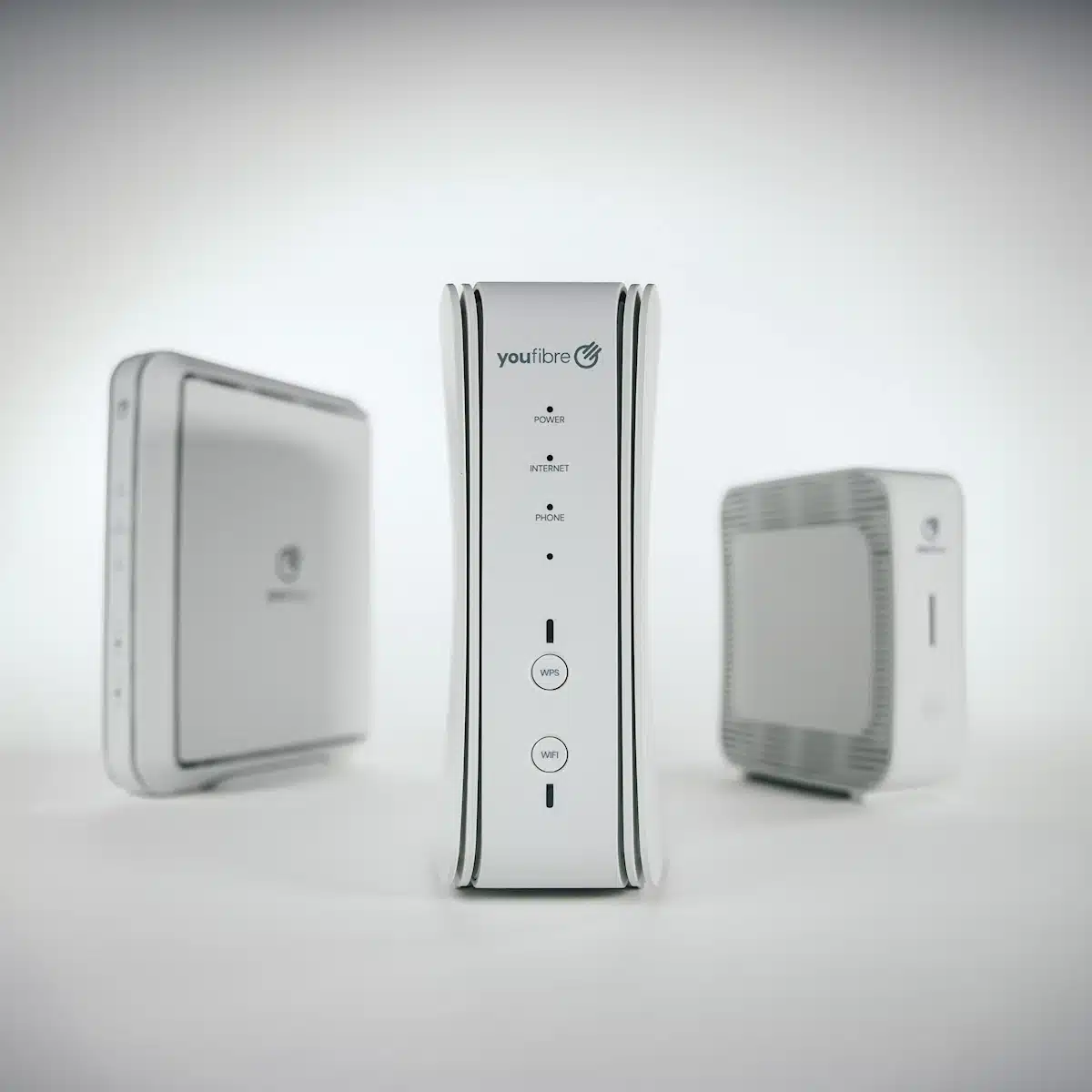
YouFibre's routers

YouFibre's included router value is exceptional. Every package gets Wi-Fi 7, useful controls and unusually capable wired connections. The Hub Pro adds 6GHz and 10Gbps Ethernet for You 8000. Restricting that router to the top package is inconvenient, but it doesn't undo the central point: YouFibre includes some of the best provider-supplied router hardware available for ordinary home use.

8.8 /10
Overall score

Included router value score

This score looks at whether the router you get included feels fair for the package, including the router’s overall quality, Wi-Fi generation, frequency bands and whether the best router is easy to get.

Annual price rises

YouFibre does something refreshingly simple: your broadband price doesn't rise during the fixed term. The monthly charge you accept at signup stays put for the full 24 months. Price changes may happen once the contract becomes monthly rolling, but there is no scheduled April increase while you are committed.

Why doesn't YouFibre raise its fixed-term price each year?

Because YouFibre locks the price for the whole term

YouFibre's contract rules out annual price increases during the fixed term. The monthly broadband charge at the start is therefore the same one you pay at the end of the 24 months, unless you choose to change the package or add another service.

There is no April calculation to remember and no second-year surprise built into the deal. For household budgeting, this is about as clear as broadband pricing gets.

Who gets the fixed-price promise?

Customers inside a YouFibre fixed term get the protection. It applies throughout the commitment, so joining shortly before April doesn't leave you facing an almost immediate scheduled increase.

Rolling monthly service is different. Once the fixed term has ended, YouFibre may make CPI-linked price changes under its contract.

The only annual rise during the term is none

Some providers deserve credit merely for displaying their annual increase clearly. YouFibre goes much further by not scheduling one at all during the fixed term.

You still need to watch the end date because the rolling price is higher. But until that date, the bill is remarkably predictable.


INTERACTIVE CHART

How much will your bill rise by?

This interactive chart shows how much this provider adds to its package prices each April, and lets you compare that with literally any other provider in our database.

Provider N/A Choose a provider
Provider average N/A The average April price rise among providers that apply one.
Compare provider N/A Choose another provider

Package annual price rises

April price rise shown package by package

Package view

The provider-average benchmark is calculated from each provider that applies an annual price rise. Fixed-price providers are shown in the chart but are excluded from the benchmark.

YouFibre's fixed-term price policy is outstanding. There is no scheduled annual increase during the 24-month commitment, so the broadband charge doesn't creep upwards each April. Few promises make a bill easier to understand. The higher rolling price still needs attention when the term ends, but it is separate from the exceptional certainty YouFibre gives you during the contract.

10 /10
Overall score

Annual price rises score

This score looks at how a provider’s in-contract annual price rises compare with the wider market, and whether the rules are simple, consistent and easy to understand.

Cost of upgrades and extras

YouFibre's extras are limited, and some useful choices simply don't exist. You can pay for YouMesh, a static IP address and YouPhone. You cannot buy broadband failover, a premium router by itself, enhanced security software or paid technical support. The result is a simple checkout, but a poor fit if you need more than broadband and Wi-Fi coverage.

How to calculate the real cost of a YouFibre broadband package

Begin with the right speed

Choose the package your household needs before considering add-ons. You 8000 is not a sensible shortcut to the Hub Pro for most buyers.

Faster packages include the standard Hub until You 8000, where the Hub Pro appears. Speed and router choice are therefore linked.

Keep the fixed price separate

YouFibre doesn't add a scheduled annual price rise during the minimum term, so there is no April increase to add to your calculation.

The post-contract rolling price is higher, though. Budgeting is simple for 24 months, then requires you to act before renewal.

Add coverage and calls separately

YouMesh adds Wi-Fi boosters for rooms the Hub struggles to reach. YouPhone adds a home-phone service if you still need one.

Neither is included with the broadband package. Add only the service your home will actually use, because each increases the monthly bill.

Arrange any extra security yourself

YouFibre doesn't bundle separate security software with its home broadband packages, and it doesn't sell a paid security add-on.

The router includes normal protections, but any device security subscription you want must be chosen and paid for elsewhere.

Know which options don't exist

YouFibre doesn't sell mobile-network broadband backup, a premium-router upgrade or a paid technical-support package for home customers.

A Battery Backup Unit can keep equipment powered in a local power cut. It cannot create another internet connection when YouFibre's network is down.

Remember: Add YouMesh for weak rooms, YouPhone for a home phone and a static IP address only for a specific need. The sparse extras list keeps checkout simple, but it also means YouFibre cannot fill several gaps later.

YouMesh is the paid extra most larger homes will notice

YouMesh and YouMesh Pro are YouFibre's whole-home Wi-Fi options. They add boosters for rooms where the main Hub signal struggles, and YouFibre supports up to two on a package. No booster comes included, even with the premium broadband tier.

Paying for coverage is reasonable when thick walls or several floors create dead spots. The disappointing part is that YouFibre attaches no measurable room-by-room speed promise or contractual payment if YouMesh still fails to deliver.

Battery power is useful, but it isn't broadband backup

YouFibre's Battery Backup Unit can power the ONT, router and phone base during a mains cut. If YouFibre's network is still working, that can keep your broadband and phone alive while the lights are out.

It does not switch you to a mobile connection when the network fails. Buyers who need internet during a line or network outage have no YouFibre broadband-backup add-on to purchase.

Static IP and YouPhone are for specific types of customer

A static IP address can be useful for remote access or particular home-network tasks. YouPhone is there for customers who still want a landline and calling service. Both cost extra because neither is part of the base broadband package.

Most homes won't need a static IP address, and many no longer use a landline. Don't add either from habit. They are useful options for the people who need them, not missing essentials for everyone else.

YouFibre extras at a glance

YouFibre sells a short list of practical extras rather than a sprawling menu. YouMesh, YouPhone and a static IP address may solve real needs. Broadband failover, premium-router upgrades, enhanced security and paid technical support are not available, so check those gaps before joining.

Most likely to matter

YouMesh

Paid boosters can improve Wi-Fi across several floors or through thick walls, but no booster is included and there is no measurable Wi-Fi guarantee.

Battery Backup Unit

This keeps YouFibre equipment powered during a mains cut. It is useful power resilience, not an alternative broadband connection.

YouPhone and calls

Home-phone service and call options cost extra, so include them in your comparison only if somebody in the home still uses a landline.

Worth checking

Security software

YouFibre doesn't include or sell a separate security suite. Choose your own only if the protections already on your devices aren't enough.

Technical support

There is no paid premium-support add-on. YouFibre's normal customer service remains the route when setup or service problems need human help.

Your own router

Third-party routers are supported and can add controls YouFibre's Hubs lack, but there is no modem mode. Setup may therefore be less tidy.

Dead ends

Static IP or premium router

A static IP address is available for an extra monthly charge. A separate paid upgrade to the Hub Pro is not.

Router choice is tied to the package

YouFibre doesn't offer a free choice of router at checkout. You 150 through You 2000 receive the Hub, while You 8000 receives the Hub Pro.

YouFibre's routers
Simple choice

Most packages get the YouFibre Hub

The standard Hub includes dual-band Wi-Fi 7, useful wired connections, parental controls and automatic updates.

It is excellent included hardware. You don't need You 8000 simply to obtain a modern router.

The limit

There is no simple Hub Pro upgrade

You cannot add the Hub Pro to a lower-speed package for a separate fee. It remains tied to You 8000.

If the standard Hub cannot cover every room, YouMesh or your own router is the realistic route. Buying vastly more speed is rarely the answer.

YouFibre offers too few extras to suit every household. YouMesh, YouPhone and a static IP address are useful where needed, but boosters always cost more and carry no measurable Wi-Fi guarantee. Broadband failover, a standalone Hub Pro upgrade, enhanced security and premium technical support are unavailable. The short list is simple, but buyers with specific resilience or support needs may have to look elsewhere.

4.5 /10
Overall score

Cost of upgrades and extras score

This score looks at how close the advertised package price is likely to be to the price you actually pay once useful extras, paid add-ons and missing options are taken into account.

End-of-contract pricing

YouFibre keeps the price fixed for 24 months, then moves the service onto a much higher monthly rolling rate unless you renew. The typical step up is substantial. Online renewal and a clear notification help, but YouFibre uses the full 40-day notice window, so this is not an email to leave sitting unread.

The rolling price rises by roughly a third

Across YouFibre's current fixed-term packages, the ordinary rolling-price increase averages about a third. Some tiers rise by less and some by more, but none rewards you for quietly staying on the same deal after the minimum term.

Your broadband keeps working and the contract becomes monthly rolling. That flexibility can buy you time, but it is expensive time. Renewing online or switching before the end date is the sensible response.

YouFibre waits until the full 40-day window

YouFibre says it will notify you 40 days before the minimum term ends. That is within Ofcom's rules, but it is also the longest wait the rules permit before the warning must arrive.

The notice appears by email and in the app. Read it when it arrives, because it contains the point at which doing nothing becomes a costly decision for you.

Online renewal makes action easier

YouFibre lets you renew through the app rather than forcing a telephone negotiation. At renewal you can keep the package, upgrade, downgrade or choose monthly rolling service.

A new discounted deal means another minimum term. Compare the renewal offer with other providers before accepting convenience alone as proof of value.

Doing nothing buys flexibility at a high price

The service doesn't stop after month 24. It continues on a monthly rolling basis, which is useful if you need time to move, compare providers or decide. You keep broadband without immediately signing another fixed term.

The higher price is the cost of that flexibility. Use the rolling option deliberately, not because the end-of-contract message disappeared beneath other email.

INTERACTIVE TOOL

What could your broadband bill roll on to?

Estimate what your monthly broadband price could look like by the end of your minimum term, and what it will jump to if you let the deal roll over.

Step 1: Choose your provider and package

Start by choosing your broadband provider, then select the package your contract is based on.

Provider
Package

Step 2: Tell us the starting month of your contract and what you pay

Use the first full monthly price before any mid-contract April increases.

Contract start month

Step 3: Estimate the rollover shock

This is an estimate. Your provider’s end-of-contract notice will be the exact figure.

Your estimate

    Where would you like to go next?

    Use the estimator before the contract ends

    Choose YouFibre and your package, enter the first full monthly bill and the month the contract began. The estimator will show how the fixed-term price develops and what the rolling rate could look like if you don't renew. Compare that result with YouFibre's actual renewal offer before deciding whether to stay.

    Five things to do before YouFibre rolls you over

    1. Check the rolling rate

      Use the estimator, then confirm the exact figure in YouFibre's end-of-contract notice.

    2. Find the renewal date

      Look in your contract, email or app and note when the 24-month minimum term finishes.

    3. Set an early reminder

      Give yourself time to compare deals before YouFibre sends its notice at the 40-day point.

    4. Compare before renewing

      Check YouFibre's offer against current deals from other providers.

    5. Choose, don't drift

      Renew, switch or knowingly use the rolling service. Accidental rollover is the expensive choice.

    The app makes renewal pleasantly simple

    YouFibre doesn't make renewal a telephone-only endurance test. The app can clearly show the available choices and let you renew online, including keeping, upgrading or downgrading the package without calling customer service at all.

    Simple does not automatically mean cheapest. Compare the offer before accepting another fixed term. A smooth renewal button is useful, but it should not replace checking what else is available from other providers.

    Remember that downgrading is normally a renewal choice, not an ordinary mid-contract option. If you bought more speed than you need, the end of the term is your practical chance to reduce it and lower the next bill. Do not let convenience lock in the wrong package again.

    YouFibre's end-of-contract position is mixed. The fixed price during the term is excellent, renewal can be completed online, and the service becomes flexible monthly rolling broadband. However, the ordinary rolling-price increase averages about a third and the warning comes at the outer edge of Ofcom's permitted window. Read the notice, compare the renewal and act before the higher rate begins.

    6.7 /10
    Overall score

    End of contract pricing score

    This score looks at what happens when your minimum term ends, how much warning you get, and how easy the provider makes it to avoid sliding onto an expensive post-contract price.

    Service guarantees

    YouFibre's minimum speed guarantee is unusually impressive, but its wider safety net is incomplete. The promised minimum matches each package's advertised average, with 30 days to fix a persistent shortfall and a penalty-free exit if that fails. There is no measurable Wi-Fi guarantee, fixed repair deadline or automatic compensation for every common service failure.

    The speed guarantee covers the connection to your Hub

    YouFibre measures its promise at the supplied router and equipment, not on a phone using Wi-Fi in a distant room. That is important because walls, floors, distance and the device itself can reduce Wi-Fi speed even when the broadband line is performing correctly.

    The remarkable part is the threshold. YouFibre's contractual minimum for every package matches its published average download speed. Few providers put such an ambitious line-speed promise into the contract. It still does not mean every device will receive the full package speed at every single moment in normal use.

    YouFibre gets 30 days to fix a shortfall

    One disappointing speed test does not release you from the contract. You must report a consistent shortfall, allow remote checks or an engineer visit, and give YouFibre its full 30-day opportunity to put the connection right.

    If the speed reaching the Hub remains below the contractual minimum after that process, you may leave without Early Termination Charges. The remedy is clear and valuable, but it depends on reporting the problem and following the fault process.

    INTERACTIVE TOOL

    Are you getting your minimum guaranteed speed?

    Choose your provider and package, then run a speed test. For the cleanest test of the broadband speed coming into your home, plug a laptop or desktop directly into your router with a LAN cable. You can also test on a phone or tablet to check Wi-Fi speed, but make sure mobile data is switched off first.

    Choose your provider and package

    Choose your provider and package so we can compare the test result with the package's minimum guaranteed download speed.

    Provider
    Package

    Before you test

    For an absolute line-speed check, use a computer connected to the router by Ethernet. If you test over Wi-Fi, the result may reflect your in-home Wi-Fi as much as the broadband line itself.

    Run the speed test

    Upload — Mbps
    Latency — ms

    Ready. Select a package, tick the data policy box, then run the test.


    Your result

    Result waiting Run the speed test to compare your download speed with the selected package’s minimum guaranteed speed.

      Where would you like to go next?

      This tool uses M-Lab’s open measurement platform. A single speed test is a useful check, but it is not a formal fault diagnosis.

      Match the protection to the problem

      Slow line speed, weak Wi-Fi and total loss of service are covered differently.

      The fault

      Your connection is slow, one room loses Wi-Fi, or the whole broadband service has stopped.

      1. The contract

      YouFibre must provide the service with reasonable care and skill. Its own terms also automatically credit qualifying service suspensions lasting more than three days. Delayed installation and missed appointments do not receive the same automatic compensation, and there is no fixed repair-time promise.

      2. The speed guarantee

      When speed reaching the supplied Hub stays below the package minimum, report it and let YouFibre investigate. It has 30 days to fix the fault. If it cannot restore the promised speed, the contract gives you a route to leave without Early Termination Charges.

      3. There is no Wi-Fi guarantee

      YouMesh can add boosters where walls, distance or several floors weaken Wi-Fi, but YouFibre promises no minimum room speed and no contractual payment if coverage still disappoints. Paying for mesh Wi-Fi therefore buys extra hardware and support, not a clear, measurable or financially backed result for your household.

      Use the right rule

      Test speed at the Hub before blaming the line for weak Wi-Fi elsewhere. Report a complete outage promptly, and keep records of fault reports and visits. The available remedy depends on what failed and whether YouFibre had the chance to fix it.

      Fibo investigating a website bug or mistake

      YouMesh improves coverage without guaranteeing it

      YouFibre describes YouMesh as whole-home Wi-Fi and supports adding up to two boosters. It may be exactly what a home with thick walls, several floors or a distant bedroom needs. Yet the promise stops short of a defined speed in every room.

      There is also no contractual payment if the boosters fail to meet your expectations. Treat YouMesh as paid coverage equipment, not as insurance against every Wi-Fi dead spot.

      YouFibre's service guarantees leave a frustrating split. Its router-level speed promise is exceptional: the minimum matches the advertised average, with a clear 30-day fix process and penalty-free exit. Yet there is no measurable Wi-Fi guarantee or fixed repair deadline, while automatic compensation covers qualifying long outages but not delayed installation or missed appointments. Excellent line-speed protection cannot fill every gap.

      5.6 /10
      Overall score

      Service guarantees score

      This score reflects how much protection you get when your broadband speed, Wi-Fi, installation, repair or service reliability doesn’t meet expectations.

      Some links on this page may earn us a small commission if you click through and buy. This never affects either what you pay, or our scores and recommendations. If, however, you’d rather bypass affiliate links, use this direct YouFibre link instead.

      Illustration of Fibo representing direct links to broadband providers