
VIRGIN MEDIA CUSTOMER SERVICE REVIEW
Virgin Media Broadband customer service: How good is it?
We’ve put Virgin Media’s customer service to the test across over 80 individual metrics, from contact routes through to complaint handling, accessibility, account support, and much more besides.


Jump to a specific section…
Where would you like to go?
Jump straight to the part you most want to read about.
Having trouble choosing a broadband provider?
No single best provider or package exists – only the best pick for you personally. Fibredog’s YourMatch™ system uses thousands of provider metrics and a lot of maths to find you your perfect match.
Virgin Media customer service scorecard
Six key areas. One overall score. All calculated using our transparent methodology.
Customer experience
What customer data says about satisfaction, complaints, call waits, review sentiment and how the provider performs when judged from outside.
Contact options
How easy it is to get help, including phone, live chat, messaging, account tools, accessibility routes and fault-support channels.
When something goes wrong
How faults and outages are handled, including checking tools, reporting routes, updates, compensation and backup options.
Help for vulnerable customers
How well extra support is provided, including accessibility routes, alternative formats, priority help, financial difficulty and nominated contacts.
Complaints policy
How clear the complaints process is, including response times, escalation steps, ADR access and specialist complaints support.
Online help and account support
How useful the digital support setup is, including apps, account portals, help articles, diagnostics, fault reporting and tracking.
Customer experience
If you never have any serious or complex issues with your service, you'll have a fine time with Virgin Media. But when things go wrong that can't be fixed or remedied easily, Virgin Media can be one of the most frustrating providers to deal with despite the wealth of contact options they provide.
Key takeaways
Absurdly negative Trustpilot reviews
There's a strong negativity bias in Trustpilot reviews of large companies. Nevertheless, there are stories there that will make your toes curl.
Low complaint satisfaction
Only around half of customers who complained to Virgin Media were happy with the outcome. Again, a lot of room for improvement there.
INTERACTIVE CHART
Compare customer experience by provider
Choose two broadband providers, then use the buttons below to compare Ofcom and Trustpilot customer experience data.
Overall service satisfaction
Ofcom satisfaction with service overall
Sources: Ofcom, Trustpilot.
Latest overall
satisfaction
83%
Industry avg: 82.8%
Complaints to Ofcom rate
56 per 100k
Industry avg: 47.2 per 100k
Average call wait
2m 17s
Industry avg: 2m 39s
Satisfaction with complaint handling
53%
Industry avg: 52.8%
According to Ofcom
According to Ofcom's annual reporting (recently lowered in frequency to every two years), Virgin Media has been below average in most categories for years, though it must be said it has improved a lot according to the most recent (2025) report.
And ultimately, if we judged providers purely on their trajectory, Virgin Media might fare better here. 56 complaints to Ofcom per 100,000 customers might sound like small beer, but consider that Sky only had 21 in the same year, and that complaining to Ofcom is really the last of all last resorts for an angry and frustrated customer.
Luckily for Virgin Media, we do factor trajectory into our scoring maths. If a provider is on an upward swing, that matters. They will score better.
Customers have historically reported long call wait times, but that has improved a great deal. That said, you do get a different agent every time you call, so you're relying on the last one properly documenting your issue so you don't have to explain it all again, and in our experience that would be the exception, not the norm.
The good news is Virgin Media has a lot of scope to improve here.
According to Trustpilot
Trustpilot is a bit of an embarrassing secret for large providers like Virgin Media. It's often the first place frustrated customers go to vent, and so it has a very strong negativity bias. to which there's no counter. People don't generally head to Trustpilot to write a review because their broadband is working as it should. You have to take that 1.5/5 average rating with a pinch of salt to some extent.
That said, Virgin Media has accumulated in excess of 100,000 reviews, and more than two thirds of them are one star out of five. Most of the issues stem from the same basic problem. That Virgin Media, like a lot of large providers with millions of customers, can feel a bit faceless.
What we specifically mean by that is no one at Virgin Media will take ownership of your problem personally if it's more complex and difficult than something basic, or not frustrating enough to warrant an official complaint. It can sometimes feel like you have to lodge a formal complaint just to get anywhere.
And although the problems reported on Trustpilot are many and varied, most of the frustration tracks back in some way or other to that core issue.
Overall, Virgin Media’s customer experience lags behind some other major providers. The data shows persistent issues with customer satisfaction and satisfactory complaint resolution – echoed vividly in the myriad negative Trustpilot reviews and bumpy Ofcom assessments. A marked improvement in the latest measurements adds a positive trajectory bonus here, preventing the score from being truly abysmal. Virgin Media is clearly working to improve – it's just not there yet.
Where would you like to go next?
Customer experience score
This score is based on Ofcom service-quality metrics and Trustpilot review trends over time, giving a balanced view of the overall customer experience.
How we calculate this score
This score looks at Ofcom service-quality metrics and Trustpilot review trends over time, including satisfaction, complaints, complaint handling, call waiting and review patterns.
We give extra weight to channels that are easy to access, available for longer hours, and useful when something has gone wrong.
Accessibility support, self-service tools and clear fault-status information also contribute to the final score. As does trajectory – whether a provider is in the process of improving or getting worse.
See all measurementsContact options
Virgin Media really does pull out all the stops when it comes to providing ways to get in touch. If you can think of it, they probably offer it.
How easy is Virgin Media to contact?
Very easy. But we will say this up front: Virgin Media wants you to go to its help centre before calling, texting or chatbotting. That's not an uncommon policy since call centres and the humans in them are an expensive commodity.
Whether Virgin Media walks that tightrope well will come down to the individual trying to get in touch. If indeed all your questions are answered by the help centre FAQs or Virgin Media's chatbot then great. But otherwise, getting to speak to a human being who will take full ownership of your problem can feel a bit like the Hitchhiker's Guide to the Galaxy's bypass plans (in the bottom of a locked filing cabinet stuck in a disused lavatory with a sign on the door saying 'Beware of the Leopard').
Live chat is relatively easy to access, but you'll probably want to direct it to put you through to a human as soon as possible, since its responses are really very limited.
Digital support is broad, but not always friction-free
One thing we'll say in favour of the Virgin Media app is that it is a bit easier to find the communication channel you want (live chat, call etc.) than it is on the main Virgin Media website. But otherwise it's largely the same experience.
That said, Virgin Media's fault checking tools are second to none. Log into the website or the mobile app, click 'Service status' and 'Check for fault' and boom! A little robot will trundle off, see if it can find any faults both with your home equipment and in the local area and report back to you. If it finds a problem with your router it'll even reset it for you. This is incredibly useful and very well implemented.
Accessibility and specialist help
There's a much more detailed section further down this page covering Virgin Media's outstanding accessibility options, so we won't prattle on too much about it here. But in short, you can get everything from large print and braille billing, through to BSL and speech to text interpretation when contacting them.
It's a real feather in Virgin Media's cap, and they even have specially trained staff to help customers with accessibility needs. Bravo.
Virgin Media has one of the most complete sets of contact options of any provider – everything from social media platforms to chatbots (and chat humans), as well as a comprehensive set of accessibility contact options.
Support channels at a glance
Virgin Media gives customers several ways to get help. This view shows which practical contact, account and fault-support routes are recorded in the fibredog dataset.
Checked from live provider data. Fibredog tracks contact routes, account tools and fault-help options separately, so this information updates soon after anything changes.
What stands out
Breadth of contact routes
From phone to WhatsApp, live chat and social media, there’s something to suit everyone here.
Great accessibility options
24/7 accessibility line, BSL video relay and textphone support mean Virgin goes well above and beyond the bare minimum.
You can achieve a lot by yourself
The app, your account tools and the fault checker and router diagnostics mean most issues can be sorted out without having to call in the first place, which going on Virgin Media's spotty customer experience record should absolutely be the preferred option.
New customers
8am – 10pm* Every day
0800 052 1734Customer service
8am – 10pm* Every day
0345 454 1111Fault support
24/7* All year round
0345 454 1111*Hours may vary on public holidays
Virgin Media does especially well here. It gives you more ways to get help than most providers, with phone, live chat, WhatsApp, accessibility support and self-service tools all available, and through a healthy span of each day, week and month.
Where would you like to go next?
Contact options score
This score is based on the range, quantity and quality of provider contact routes, support tools, and the availability and ease of use of the various means available.
How we calculate this score
This score looks at the number, range and usefulness of Virgin Media’s contact routes.
We give extra weight to channels that are easy to access, available for longer hours, and useful when something has gone wrong.
Accessibility support, self-service tools and clear fault-status information also contribute to the final score.
See all measurementsWhen things go wrong
Problems happen, but what matters is how quickly they’re spotted and fixed. This section looks at the tools, reporting routes and safety nets Virgin Media gives you when your broadband service has a bad day.
Spotting the problem
We're going to give Virgin Media some credit here. When there's a fault, nine times out of ten, Virgin Media is already in the process of fixing it before you even know something is wrong. And they're good at letting you know, too. You'll likely get an email, text or both to inform you of any outages in your area.
If it's something you have to report yourself, there are myriad ways to do that, and most problems aren't more than a quick online fault-checker and/or router reset away.
Reporting the issue
If those tools can’t fix the problem, Virgin Media lets you report a fault online or by phone. That matters because some issues need deeper checks, an engineer visit, or account-specific support – and rarely, some issues need even deeper and more complex fixes.
Once the issue has been reported though, you'll be able to follow updates through Virgin Media’s online account tools or the app, rather than having to start again every time you get in touch. Having said that though, the second agent you speak to knowing what it was you spoke about with the first can be trying at times.
If the outage drags on
For a total loss of service caused by a network issue, Virgin Media offers automatic compensation, so you should not need to claim manually. There is also a repair-time commitment for eligible faults, which means additional compensation may apply if the problem is not fixed within the expected window.
The main gap is broadband backup. If your Virgin Media connection goes down and you need guaranteed connectivity while you wait, you may need a separate mobile data option or another fallback.
Virgin Media gives you a solid set of tools for checking, diagnosing and reporting faults. The compensation safety net is useful, but the lack of standard broadband backup does leave a gap if staying connected is critical, which you'll likely need to fill with your mobile phone's data.
The Virgin Media fault process
From checking the problem to getting back online, Virgin Media gives you several easy routes to getting things sorted.
1. Check
Use your service status checker or area fault checker in your online account or via the app to see if there’s a known issue.
2. Diagnose
You can run online or app-based diagnostics to test your hub, connection and setup.
3. Report
You can report the fault online or by phone if the issue needs deeper investigation.
4. Track
Follow updates through your online account or the My Virgin Media app.
5. Resolve
Automatic compensation and repair-time commitments may apply if the outage goes on long enough and Virgin can’t fix it.

Fault checking
You can check your own connection and your area.
Diagnostics both online and in app
You’ll find guided checks to find problems.
Report online or by phone
Quick reporting available via app or online account.
Compensation for outages
It’s automatic for a total loss of service.
Broadband backup
Isn’t available from Virgin Media. Yet.
When problems strike, Virgin Media makes it straightforward to check, report and track faults. Automatic compensation and repair-time commitments add reassurance, although broadband backup isn't yet available from Virgin, though rumour has it it’s being tested.
Where would you like to go next?
When things go wrong score
This score reflects the quality of fault-checking tools, reporting options, outage handling, compensation and the availability of broadband backup.
How we calculate this score
This score looks at how easy it is to check, diagnose, report and track broadband faults.
We give weight to service-status tools, area fault checkers, online and app-based diagnostics, and both online and phone fault-reporting routes.
We also score the safety nets that apply if a fault drags on, including automatic compensation, repair-time commitments and whether broadband backup is included, or indeed available at all.
See all measurements
Having trouble choosing a broadband provider?
No single best provider or package exists – only the best pick for you personally. Fibredog's YourMatch™ system uses thousands of provider metrics and a lot of maths to find you your perfect match.
Help for vulnerable customers
Virgin Media goes far beyond the basics to make sure its service is accessible to everyone. It offers a wide range of ways to communicate with them, including phone, live chat, WhatsApp, and community forums when they're working (right now they're not), with text relay and BSL video relay also available through dedicated accessibility support.
Support when you need it
Virgin Media’s support for vulnerable customers really is extremely good, with only one or two others, like Plusnet, even coming close. You can register your extra support needs when you sign up, arrange a nominated contact, request accessible billing and you can even get help if you're affected by financial difficulty, bereavement or other similar circumstances.
Priority fault repair is also available, which matters because loss of service can be much more serious if your ability to do something about it is impaired in some way.
A broader support framework than most
Virgin Media provides literally all of the main protections and support routes we look for – its approach is more complete than we see from most other broadband providers.
The important difference is that this is not just a single accessibility page or a basic helpline. Virgin Media gives you many practical ways to get help in the format that works best for you.

Support Award
Virgin Media is best in class for this category
Virgin Media provides all of the major accessibility and vulnerable-customer support features we assess.
Virgin Media is the gold standard
Right now, Virgin Media is clocking in a perfect ten in this category. That's astonishing when you think about it. Fibredog rates providers on thirteen different metrics in this category, so to get a perfect score in all of them – well, that's quite something.
That's not to say, necessarily, that all other providers are terrible here. It's more like most providers offer some forms of support for vulnerable customers and not others, while Virgin Media offers them all.
This is why Virgin Media receives our Outstanding Support award here. It's the best of the best of the best. Sir.
How BSL and accessible help work with Virgin Media
-
1
Choose your support route
Pick the way that works best for you: phone, chat, email, WhatsApp, or accessibility line.
-
2
Use relay / BSL / accessibility support
Access text relay, BSL video relay or other accessibility services through the support team.
-
3
Explain your needs
Let Virgin Media know what help you need – extra time, alternative formats, nominated contact, priority repair and more.
-
4
Get tailored help or escalation
Virgin Media can resolve the issue or escalate it for a priority response if you need it.
-
5
Ongoing support if needed
Virgin Media can keep supporting you, with follow-ups and adjustments where required.
Accessibility options
- ✓ BSL video relay and text relay
- ✓ Braille and large print billing
- ✓ Accessibility-trained advisors
- ✓ Accessible website and app
Extra protection
- ✓ Nominated contact available
- ✓ Priority repair available
- ✓ Clear policies
- ✓ Specially trained teams
Practical support
- ✓ Help with financial difficulty
- ✓ Bereavement support team
- ✓ Broadband social tariff
- ✓ Payment arrangements
Virgin Media’s support for vulnerable customers runs the full gamut from amazing to astounding. Every base is covered here from BSL support, through to bereavement support, financial difficulty support, braille and large-text bills and more. This is one of the areas in which Virgin Media truly excels.
Where would you like to go next?
Accessibility score
This score reflects the support available for vulnerable customers, including accessibility help, priority repairs, alternative formats, financial difficulty support and social tariffs.
How we calculate this score
This score looks at the practical support available for vulnerable customers and customers with additional accessibility or financial needs.
We score vulnerable customer policies, accessibility support, priority repairs, nominated contacts, alternative-format billing, text relay, sign language support and bereavement support.
We also include financial difficulty support and whether the provider offers a social tariff for eligible customers.
See all measurementsComplaints policy
Virgin Media aims to put things right when you’re not happy. This section reviews its complaints process, how and when to escalate, and how to access independent help if needed.
Virgin Media complaints process explained step-by-step
Raise a complaint
Virgin Media gives you several routes to complain, including phone, online contact, app support and post. However, you must keep in mind that you need to be clear with Virgin Media you are making a formal complaint that you want escalated to their complaints team.
Get a response
The policy gives a response-time commitment, with straightforward complaints handled faster than more complex cases.
Escalate internally
If the first answer is not enough, Virgin Media explains how the complaint can be escalated inside the business.
Deadlock or 8 weeks
ADR only becomes relevant once a deadlock letter has been issued or the complaint has remained unresolved for 8 weeks.
Independent ADR
If it reaches that stage, the complaint can go to CISAS for an independent decision.
ADR is the final escalation route. It is not the first step, but it is important that Virgin Media explains when and how customers can use it.
How clear is Virgin Media’s complaints process?
Virgin Media sets out its complaints code of practice, explaining what you can expect and how it will handle your complaint. You can get in touch by phone, live chat, WhatsApp, email, post or through the My Virgin Media app, which gives you plenty of choice.
The process is clearly structured with defined timescales. You don't want to have to ever use it, but if you do the instructions are clear.
How well does Virgin Media explain escalation?
Virgin Media explains how to escalate if you’re not happy with the initial response. You can ask for your complaint to be reviewed by a manager, senior manager or the resolutions team.
If you’re still not satisfied after 8 weeks, you can request a deadlock letter. This is clearly explained in Virgin Media’s complaints policy and helps you move to the next stage.
How useful is its ADR route?
Virgin Media uses CISAS, an independent ADR scheme approved by Ofcom. You can only go to CISAS after Virgin Media has issued a deadlock letter or 8 weeks have passed without a final response.
CISAS is free for consumers and its decisions are fair and binding on Virgin Media. This gives you a strong independent route if your complaint can’t be resolved internally.
Independent ADR provider
If Virgin Media can’t resolve your complaint, CISAS is the approved ADR scheme for its services.
- 70 Fleet Street, London EC4Y 1EU
- 0207 520 3814
- cisas@cedr.com
- cedr.com/cisas
Accessible complaints support
Virgin Media provides accessible complaint handling, including text relay 18001 0800 052 1734, BSL video relay and extended-hours support. Extra help is available for vulnerable customers and those with additional needs.
How Virgin Media deals with complaints
Code of practice
Follows a clear complaints code of practice
Complaint routes
Phone, chat, WhatsApp, email, post and app
7-day response aim
Acknowledged within 7 days, resolved in up to 28 days
Escalation process
Escalate to manager, senior manager or resolutions team
ADR after 8 weeks
Deadlock letter or 8 weeks unlocks ADR via CISAS
Accessibility support
Text relay, BSL video relay and extra support
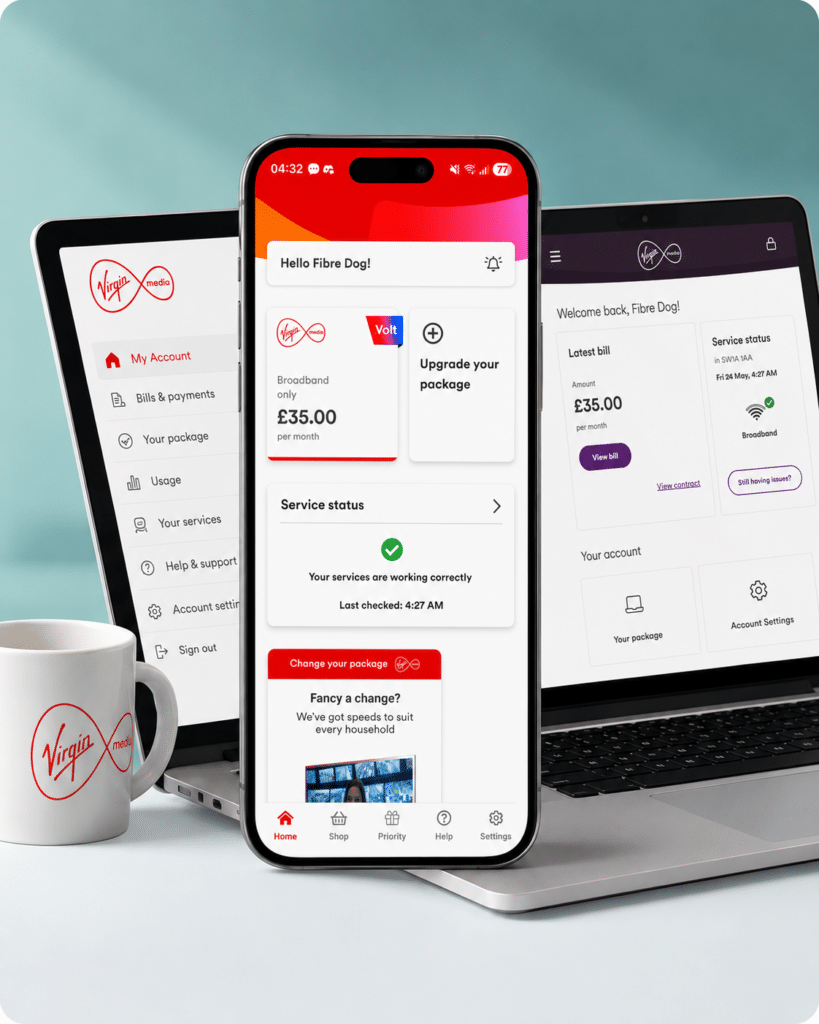
Virgin Media’s complaints process is clear and well-structured with defined response times, and access to independent ADR through CISAS after 8 weeks is a key strength. Virgin’s biggest problem in this area remains how often customers have to resort to lodging a formal complaint to get traction with non-standard issues.
Where would you like to go next?
Complaints policy score
This score reflects how clear and effective Virgin Media’s complaints process is, including response times, escalation options, ADR access and support for vulnerable customers.
How we calculate this score
This score looks at how clear, accessible and useful the provider’s complaints policy is.
We give weight to whether the provider publishes a complaints code of practice, provides clear complaint routes, explains its response times and sets out how customers can escalate unresolved complaints.
We also score independent ADR access, including whether the ADR scheme is named, when customers can use it, and whether accessible complaints support is available.
See all measurementsOnline help and account support
With both a dedicated app and the My Virgin Media online portal, Virgin Media makes it pretty easy to reach out to them, monitor your account, and identify and fix issues. Here's a quick look at the self-service tools, app, account management features and digital support options available to you. Primarily, you can...
Manage your account and bills online
The My Virgin Media account and mobile app put everything in one place. You can view and pay bills, manage your package, add services and track usage. There's not a lot to choose between the app and the online account, though – they're both doing mostly the same job, so it boils down to preference.
Report an issue
The Help Centre has hundreds of searchable articles and guides. You can get answers straight away, or use live chat or the chatbot which can hand you over to a human when needed. Our experience, not just with Virgin Media but with providers in general, is that chatbots can rarely help with real-world problems.
Diagnose and fix issues yourself
Run checks on your broadband, WiFi or services using online or in-app diagnostics. You can check for local outages, run connection tests and follow step-by-step fixes before reporting a fault.
Report and track faults
Report issues online or in the app and track progress in real time. You’ll get updates as engineers are assigned and when the problem is resolved.

No email support
Virgin Media does not offer email support. That may seem like a small thing, but we see it as an important predictor of problem ownership: an email trail makes it easier to keep a clear record of what has been promised, instead of starting again with a different adviser each time.
How Virgin Media’s digital support works
-
1
Sign in
Sign in to My Virgin Media or the app to view your account and services.
-
2
Check help articles
Search the Help Centre for guides, fixes and account support.
-
3
Use live chat or chatbot
Get instant answers, or chat with a human agent when needed.
-
4
Run diagnostics
Use online or in-app tools to test and fix broadband issues.
-
5
Report and track faults
Report problems and track updates until the issue is resolved.
What you can do on the app
The My Virgin Media app gives you a quick way to manage the everyday parts of your account without needing to call. You can check your bill, view package details, track service status, and run basic checks from your phone.
It’s especially useful for common bugs and faults. The app can show whether your broadband is online, flag known local network problems, take automated action to fix it, or point you towards booking an engineer visit.
You can also use the app to manage your package, view your account details and access various other types of support. That makes it a useful first stop for anything less cataclysmic than the sky falling on your head.
The main limitation is that Virgin’s app-based support still depends on the quality of the help behind it. If the app sends you in circles or fails to connect you to a human when needed, the convenience wears off at the same pace patience wears thin.
What you can do online
Virgin Media’s online account area gives you another way to manage your bills, check your package details and identify service issues. You can view your latest bill, check payment information, manage parts of your package and access support, all through the My Virgin Media portal (Virgin’s name for your online account).
The online help centre is also important. It gives you access to searchable guides, troubleshooting pages, service-status checks and fault-reporting FAQs without needing to call. And Virgin will want you to do that first, because common problems are often easily addressed that way.
For most broadband problems, online diagnostics can help identify whether the issue is with your connection, router or a known fault in your area. That can save time if the problem is simple, or give you a clearer route to report it if you need more help.
The drawback is the lack of email support. Virgin Media offers several digital routes, but without email there is less opportunity to keep a simple written trail of what has been said, promised or escalated. And generally, big companies that are most renowned for their customer service (e.g. Octopus Energy) do offer that, so its absence here is rather deafening.

Virgin Media’s Community Forum
Virgin Media’s Community Forum is usually an excellent place to find answers to very specific problems that go beyond the normal FAQs.
When available, it can be useful for setup issues, router questions, local service problems and real-world fixes from other Virgin Media customers.
Currently unavailable: at the time of writing, the Community Forum has been down for maintenance for the past month or two, so it cannot contribute positively to this section’s score.
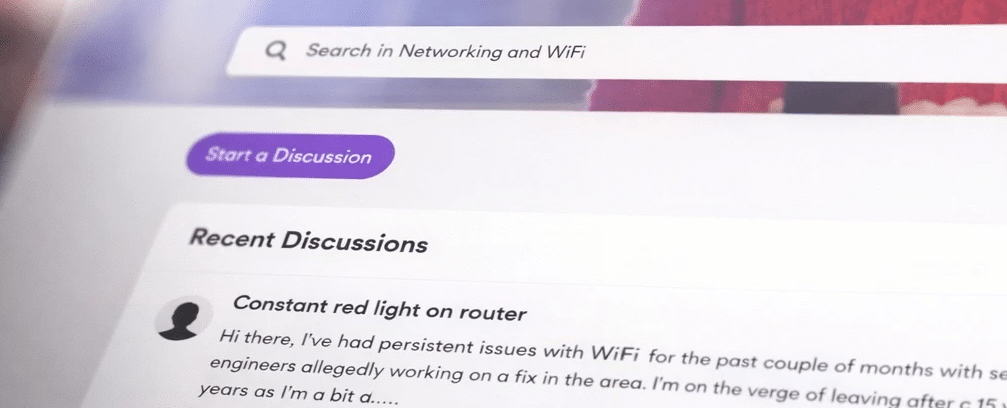
Virgin Media’s online help and account support is pretty good overall, with useful account tools, app support, live chat, diagnostics and online fault reporting. But the lack of email support, and therefore the inability to form a recorded information chain, remains Virgin’s Achilles heel.
Where would you like to go next?
Online help and account support score
This score reflects the quality and range of self-service tools, account management, help content, diagnostics, digital support routes and written support options.
How we calculate this score
This score looks at how well a provider lets customers manage their account, find help, diagnose faults and report problems online.
We give strong weight to email support because it creates a written record and helps with issue ownership. We also score live chat with human agents, fault diagnostics, online fault reporting and service-status tools highly.
Account tools, billing, package management, help articles, chatbot support and community forums also contribute to the score, but with lower weighting.
See all measurements
Having trouble choosing a broadband provider?
No single best provider or package exists – only the best pick for you personally. Fibredog's YourMatch™ system uses thousands of provider metrics and a lot of maths to find you your perfect match.
Some links on this page may earn us a small commission if you click through and buy. This never affects either what you pay, or our scores and recommendations. If, however, you’d rather bypass affiliate links, use this direct Virgin Media link instead.
